



Most flower shops don't have a pricing problem. They have a too-many-things problem.
Walk the cooler of any shop that's been open more than three years and you'll find it: the vase style that sold well in 2021 and now moves twice a season, the "signature" arrangement nobody orders but the owner refuses to retire, the four ribbon colors that exist because a supplier had a minimum order. None of these are catastrophic on their own. Together they quietly eat cooler space, designer attention, purchasing cash, and your ability to actually read what's working.
Florist SKU rationalization is the discipline of periodically pruning that clutter — not by gut feel, but against numbers you decide on ahead of time. The trick isn't identifying your worst product. Everyone can name their worst product. The trick is building a repeatable cadence so pruning happens before the assortment bloats again, and so you don't accidentally kill a low-volume SKU that's actually holding a high-value customer relationship together.
This article lays out the whole system: how often to prune, the numeric thresholds that trigger a decision, the KPIs that matter, and how to tell the difference between "retire this" and "promote this harder." There's a worked pruning worksheet at the end you can copy.
Why assortments bloat (and why nobody notices until it hurts)
SKU creep is almost never one bad decision. It's the accumulation of small, reasonable ones.
A bride asks for a specific dusty-rose garden rose, so you bring it in. A corporate client wants a taller vase, so you add a size. A holiday collection introduces six seasonal wraps and only two get retired afterward. Each addition felt justified in the moment. The problem is that additions have a champion — someone who wanted the thing — and subtractions have nobody. Removing a SKU is an orphan task, so it never gets done.
In practice, assortments tend to grow roughly 15–25% a year in raw SKU count while revenue grows far slower or stays flat. That gap is the tell. You're carrying more complexity to produce the same money.
-
Cooler and bench space. Slow SKUs occupy premium real estate that faster movers could use. This directly undercuts the freshness-aware merchandising most shops are trying to run — a topic worth revisiting in the storefront display system.
-
Designer decision time. Every extra option is a micro-decision at the bench. More variants mean slower assembly and more "which one did they mean?" moments.
-
Purchasing cash and shrink. Low-velocity stems get bought in small quantities, age faster relative to sell-through, and end up in the compost. The margin math on these is almost always worse than owners assume.
The insight most owners miss: a bloated assortment doesn't just cost money directly. It blinds you. When you carry 300 SKUs and 40 of them produce 80% of revenue, your reports are full of noise. You can't forecast well, you can't negotiate with suppliers effectively, and you can't tell a genuinely promising newcomer from dead weight.
Set the cadence before you set the thresholds
Pruning has to be scheduled or it won't happen. The right rhythm for most single-location florists is quarterly, with a lighter mid-quarter check during your two biggest seasons.
Never miss a bloom or a delivery.
Blomsly helps you manage orders, track stock, and schedule deliveries effortlessly.
- Unified order management
- Real-time inventory tracking
- Delivery scheduling & notifications
No credit card required
Quarterly works because floral demand is seasonal enough that a shorter window gives you noisy data — one slow month kills a SKU that's actually fine — and an annual window is too slow. You carry dead weight for three extra seasons before acting.
-
Q1 review (late January) Post-holiday reckoning. Retire Valentine's-adjacent and winter SKUs that underperformed. Cleanest data window because holiday noise has passed.
-
Q2 review (late April) Post-Mother's Day prep and spring assortment tune. Decide what carries into wedding season.
-
Q3 review (late July) Mid-year margin check. Summer is usually your slowest period, which makes it the honest test — SKUs that survive July on their own merits are keepers.
-
Q4 review (early October) Lock the assortment before peak. You do not want to be pruning in December. This review is about freezing a clean, tight list going into your highest-volume, lowest-slack months.
One rule that saves people a lot of grief: never retire a SKU during its own peak season. A poinsettia arrangement evaluated in July looks like garbage. Judge seasonal SKUs against the same season a year prior, not the current slow month.
Here's a simple workflow diagram of the quarterly pruning process.
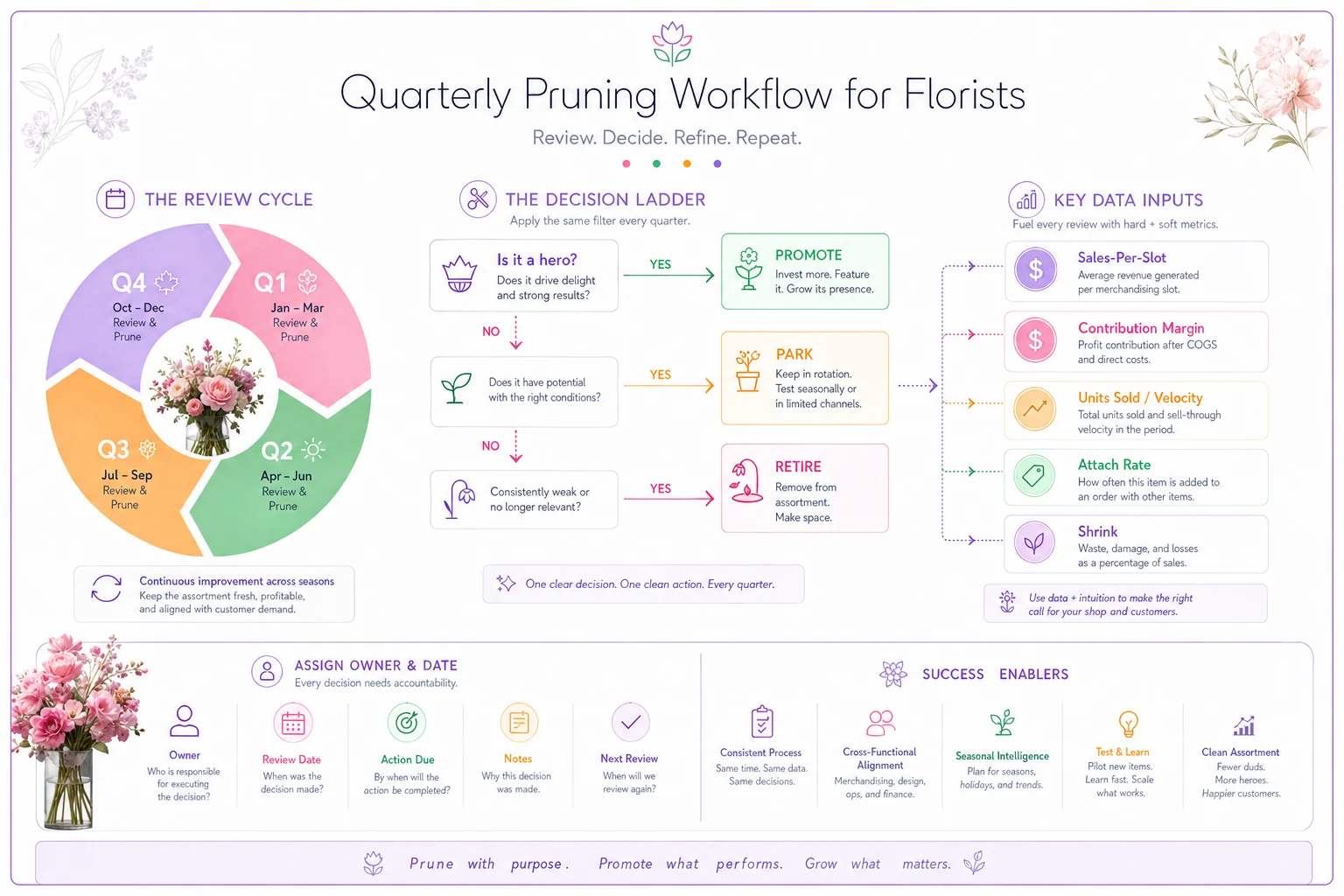
A workable annual cadence looks like this: follow the reviews, keep seasonal evaluations against the same season last year, and don't prune in peak months.
The KPI set that actually drives the decision
You don't need a dashboard with forty metrics. Four numbers carry almost all the weight for pruning decisions.
| KPI | What it tells you | Rough florist benchmark to react to |
|---|---|---|
| Sales per cooler-slot (or per sqft) | Whether the physical space is earning its keep | Bottom 20% of SKUs by this metric are prune candidates |
| Contribution margin % | Profit after stem/materials cost, not just revenue | Below ~45% on a made arrangement is a yellow flag |
| Units sold / velocity | Real demand, not vanity revenue | Fewer than ~6–8 units per quarter for a core SKU |
| Attach / conversion rate | Whether it pulls its weight in the buying flow | Add-ons converting under ~5% of eligible orders |
A few things about how to actually use these.
Sales per slot beats total sales. A SKU can post decent revenue and still be a loser if it hogs three cooler slots and a bench station to do it. Always normalize against the resource it consumes. This is the single most common mistake — owners defend a product because "it still sells" without asking what that shelf could do instead.
Margin has to be real margin. Not menu price minus stem cost. Include the shrink rate on the inputs. A rose variety with a 30% throw-away rate has a very different true margin than the menu suggests. If you've already built shrink into your SKU classification — the approach in the perishable inventory lifecycle rules — you're most of the way there.
Velocity thresholds scale with SKU role. A hero SKU doing 8 units a quarter is dying. A niche sympathy piece doing 8 units a quarter might be exactly right for its job. Which is why you can't apply one number to everything — you need SKU tiers.
Hero-SKU rules: protect the winners from the pruning
Before you cut anything, tag your heroes and put them off-limits.
A hero SKU is one that either (a) drives a meaningful share of revenue, (b) is the entry point that brings new customers in, or (c) anchors a bundle or occasion people specifically come to you for. Roughly the top 10–15% of your list by contribution dollars.
-
Heroes are never pruned on a single quarter's dip. They get a two-quarter grace window.
-
Heroes get first claim on cooler space and prime bench position.
-
If a hero's margin slips, you fix the input cost or reprice — you don't retire it.
-
A hero can lose hero status and drift into the normal pool, but that's a demotion decision, not a same-day cut.
The reason to formalize this: without a protected tier, a bad numbers month can panic you into cutting something structural. The whole point of a framework is to stop emotional decisions in both directions — no sentimental keeps, no panic cuts.
For everything below the hero tier, group into three buckets:
-
Core consistent movers, moderate margin, reliable. The backbone.
-
Niche/strategic low volume by design (sympathy, high-end, specialty). Kept for relationship or completeness, judged on different velocity math.
-
Tail low volume, no strategic reason, thin margin. The prune pool.
Formal tiers keep you from accidentally trimming structural pieces and give you clearer threshold rules for the non-hero population.
Retirement thresholds: the numeric triggers
This is where the framework earns its keep. A SKU enters the retirement review — not automatic deletion, review — when it trips two or more of these in a quarter:
-
Sales-per-slot in the bottom 20% of its tier
-
Contribution margin below 45% (made items) or below ~35% (resale items like vases, plush, cards)
-
Velocity under the tier threshold (Core
6/quarter; Tail: any)
-
Attach rate under 5% for add-on SKUs
-
True shrink rate above 25% on the primary input
Tripping one threshold puts a SKU on watch. Tripping two or more triggers a formal keep/promote/park/retire decision. Requiring two triggers prevents you from retiring a solid product over a single bad metric — a high-margin niche piece with low velocity is fine, that's its job.
Promote vs. park vs. retire
Not every underperformer should die. Three of the four outcomes keep the SKU alive in some form.
Promote when a SKU has strong margin and positive feedback but weak visibility. Low velocity because nobody sees it, not because nobody wants it. The fix is merchandising, a better product photo, or bundling it into a package. Sometimes a slow SKU just needs to be built into a prebuilt bundle — the logic behind prebuilt package SKUs that cut designer decision time. Promotion is your first move whenever the margin is healthy but the eyeballs aren't.
Park when a SKU is seasonal or event-driven and simply out of window. You don't retire your tall pillar-candle centerpieces in February — you park them and pull them back for gala season. Parked SKUs come off active cooler space and out of active reports, but stay in the catalog with a "reactivate on [date]" tag.
Retire when the SKU is low-margin, low-velocity, has no strategic role, and promotion has already been tried and failed. Retirement means: stop reordering the inputs, sell through remaining stock (a clearance channel, not your hero shelf), and remove the option from your build menus.
The decision flow, in order:
-
Is it a hero or protected? → Keep, no further review.
-
Does it have strong margin but weak visibility? → Promote, re-evaluate next quarter.
-
Is it seasonal and out of window? → Park.
-
Low margin, low velocity, no role, already promoted once? → Retire.
That ordering matters. Owners jump straight to "retire" and skip the promote step, killing salvageable SKUs. Run the ladder top to bottom every time.
A worked example
Take a shop reviewing its Q3 list. Three candidates trip the thresholds:
SKU A — "Petite Succulent Trio" (planter add-on). Attach rate 3%, margin 62%, velocity around 4 units per quarter. Two triggers: low attach, low velocity. But the margin is excellent. This is a promote, not a retire — it's invisible at checkout. Moving it into the online cart flow and photographing it properly is the play. Retiring a 62%-margin item because nobody sees it would be a mistake.
SKU B — "Classic Dozen — Lavender Roses." Velocity around 5/quarter, margin 38%, shrink on the lavender stems running roughly 30%. Three triggers. Lavender roses come in unreliably and a significant portion throw out. This one's a genuine retire — the color underperforms the red/pink equivalents and the shrink is dragging the whole rose category's margin down. Sell through remaining stems in mixed bouquets, stop the standing order.
SKU C — "Autumn Harvest Centerpiece." Velocity 2/quarter in July, margin 51%. Looks terrible — until you check that it's a fall SKU being evaluated in the middle of summer. Park it. Reactivate mid-September. Cutting it now would delete a perfectly good seasonal earner based on completely irrelevant data.
Same worksheet, three different outcomes. That's the entire point — the framework produces the right verdict for each, instead of a blanket cut.
Sample pruning worksheet
Run every review candidate through this. One row per SKU.
Pruning worksheet columns:
-
SKU name / code
-
Tier (Hero / Core / Niche / Tail)
-
Units sold this quarter
-
Sales per slot (revenue ÷ slots consumed)
-
Contribution margin % (after shrink)
-
Attach/conversion rate (if applicable)
-
True shrink rate on primary input
-
Triggers tripped (count)
-
Promotion already attempted? (Y/N)
-
Seasonal/out-of-window? (Y/N)
-
Verdict Keep / Promote / Park / Retire
-
Action + owner + date
The "action + owner + date" column is the one people skip and the one that makes the whole thing work. A verdict with no owner and no date is a suggestion, and suggestions don't survive contact with a busy week. "Retire lavender dozen — Maria — stop reorder by Aug 15" is an actual decision.
When this makes sense — and when it doesn't
Do this if: you're carrying more than 80–100 SKUs, your cooler feels perpetually tight, your compost bin is heavier than it should be, or you genuinely can't say which 20 products drive most of your revenue. Those are all symptoms of an assortment that's outrun your ability to manage it by feel.
-
You're carrying more than 80–100 SKUs
-
Your cooler feels perpetually tight
-
Your compost bin is heavier than it should be
-
You genuinely can't say which 20 products drive most of your revenue
Skip the formal version if: you're a very small operation running 30–40 tight SKUs you already know cold. At that size the overhead of a quarterly worksheet may exceed the benefit — a once-a-year cleanup is probably enough. Don't build machinery you don't need.
-
Very small operation with 30–40 tight SKUs
-
You already know your assortment cold and don't need quarterly overhead
Who should be careful: shops with a lot of custom or bespoke work where "SKUs" are loosely defined. If most of your revenue is one-off design work, prune your ingredient list — stems, containers, ribbons — rather than finished-product SKUs. The same margin and shrink logic applies, just at the input level.
Keeping the data honest as you grow
The framework is only as good as the numbers feeding it, and this is where shops stumble at scale. Two locations, three sales channels, wire-service orders, walk-ins — and suddenly your "velocity" number is stitched together from four places by hand, the night before the quarterly review. That's how pruning decisions get made on stale or partial data.
At a certain size it's worth having your sales, cooler-slot mapping, and shrink logged in one operational system that tags every order to a SKU automatically, so sales-per-slot and true margin are always current instead of reconstructed each quarter. The point isn't the software — it's that the four KPIs above should be readable in minutes, not assembled from receipts. When the numbers are trustworthy and up to date, the quarterly review stops being a research project and becomes a 30-minute decision meeting.
Whatever tool you use, the standard is the same: if you can't pull sales-per-slot, real margin, and shrink for any SKU without a spreadsheet archaeology session, fix the data plumbing first. Pruning on bad data is worse than not pruning at all.
The real payoff
A tight assortment isn't about having fewer products for its own sake. It's about every SKU on your bench earning its slot, so your space, your designers' attention, and your purchasing cash all flow toward what actually sells.
Shops that run this quarterly tend to notice the same patterns after a few cycles: the cooler stops feeling jammed, compost drops, forecasting gets easier because the signal isn't buried in tail-SKU noise, and new-product experiments get a fair test because there's actually room to see them clearly. None of that comes from one heroic purge. It comes from the cadence — the boring quarterly habit of running the worksheet, honoring the thresholds, and letting the four outcomes do their work.
Start with one review. Tag your heroes, pull your four KPIs, run every candidate down the keep/promote/park/retire ladder, and assign an owner and date to each verdict. Then put the next review on the calendar before you close the file. The framework only compounds if it repeats.
Start with one review. Tag your heroes, pull your four KPIs, run every candidate down the keep/promote/park/retire ladder, and assign an owner and date to each verdict. Then put the next review on the calendar before you close the file. The framework only compounds if it repeats.
Ready to grow your flower shop business?
Join 500+ flower shops using Blomsly to save time, reduce errors, and delight customers with fresh blooms.