


The most expensive failures in a flower shop almost never look dramatic. Nobody drops a vase. It's quieter than that: your website shows 8 premium roses available, your POS thinks there are 3, and by the time someone notices, you've already promised both a same-day arrangement and a wedding centerpiece the same last dozen. Now you're on the phone apologizing, upgrading someone for free, or driving across town to a competitor to buy stems at retail.
That gap between what your systems say you have and what you actually have is the root of most sync failures. And it compounds as you add channels. A shop selling only over the counter never runs into this. A shop selling on its own site, a wire service, a marketplace, plus walk-ins and phone orders has four or five places where reality and the record can drift apart.
This is a systems article, not a tips list. The goal is to give you a florist integrations playbook — a simple data model, sensible sync patterns, and recovery SOPs — so that when something breaks (and it will), you catch it in minutes instead of finding out from an angry customer.
The real problem: you don't have one source of truth, you have several
Most small shops don't decide to run multiple sources of truth. It happens by accident. You get a POS. Then you add online ordering. Then a wire service plugs in. Each system stores its own version of "what's available" and "what's reserved," and none of them fully trusts the others.
The core issue is that inventory and reservations are two different things, and cheap integrations tend to blur them. Inventory is how many stems physically exist. A reservation is a claim against that inventory — an order that isn't fulfilled yet but has already spoken for product. When your systems only sync raw counts and ignore reservations, you get double-sells. When they sync too slowly, same result. When a return or cancellation doesn't flow back, you either oversell or leave sellable product locked up.
The pattern worth internalizing: double-sells are almost never a counting error. They're a timing error. Two channels both read "available" during the same window before either one writes back "reserved." Fix the timing and the model, and the counting takes care of itself.
A minimal data model that actually holds up
1. SKU (the sellable thing) Keep it small. A SKU record needs an ID, a human name, a type (finished arrangement, raw stem, greens, hard good), and a perishability class. The perishability class matters because your sync and recovery rules differ between a ceramic vase and a bucket of garden roses that die in a week.
Never miss a bloom or a delivery.
Blomsly helps you manage orders, track stock, and schedule deliveries effortlessly.
- Unified order management
- Real-time inventory tracking
- Delivery scheduling & notifications
No credit card required
2. Location / stock bucket Where the product lives and its state. This is the piece most small shops skip. A rose isn't just "in the cooler" — it's in one of a few states: on-hand, reserved, in-design, or shrink/dumped. If your model only tracks on-hand, you can't prevent double-sells, because you have no way to represent "spoken for but not yet used."
3. Reservation The bridge. A reservation links an order to specific SKUs and quantities, with a status (pending, confirmed, fulfilled, canceled, returned) and a timestamp. This is the single most valuable record in the whole system and the one cheap integrations handle worst.
Here's how those three interact in practice:
| Event | On-hand | Reserved | Available (on-hand − reserved) |
|---|---|---|---|
| Start of day: 24 premium roses | 24 | 0 | 24 |
| Web order for 12 comes in | 24 | 12 | 12 |
| Phone order for 6, entered in POS | 24 | 18 | 6 |
| Designer pulls the 12 for the web order | 12 | 6 | 6 |
| Web customer cancels the other 6 | 12 | 6 | 6 |
| Walk-in buys 6 off the counter | 6 | 0 | 6 |
The number every channel should display is available, not on-hand. Almost every double-sell traces back to a system showing on-hand when it should have shown available.
Sync frequency: match the cadence to the perishability and the channel
Not everything needs real-time sync, and pretending it does will burn you out chasing false alarms. The right question is: how fast does a stale number here cause a real loss?
-
Reservations and available counts on same-day channels need near-real-time sync — seconds to a couple of minutes. This is where double-sells live. If your web store and POS reconcile availability only every 30 minutes, you've built a 30-minute window where two customers can claim the same last bunch.
-
Raw on-hand inventory counts (full stem counts, hard goods) can sync on a slower cadence — a few times a day is usually fine, since these change in larger, deliberate batches when you receive deliveries or run counts.
-
Catalog and pricing can sync slowest of all — daily or on-change. Nobody loses an order because a price description updated an hour late.
A typical pattern that works for a shop with a website, a wire service, and in-store POS:
-
Availability decrements sync immediately on every order across every channel. The moment a reservation is created anywhere, available drops everywhere.
-
On-hand truth is reconciled 2–3 times daily — morning after the delivery is checked in, midday, and end of day.
-
A nightly full reconciliation compares reservations against fulfilled orders and flags anything that doesn't add up.
The immediate-decrement rule is the one that prevents most pain. If you can only make one change, make availability write back the instant an order lands, on every channel.
Where it breaks at scale
At one channel and 15 orders a day, you can eyeball everything. But watch what breaks as volume and channels grow:
-
Two channels, moderate volume Occasional double-sells during peak hours because sync lags behind order velocity. Annoying but survivable.
-
Three-plus channels, seasonal spikes Reservations from one channel don't reduce availability on another fast enough. On Valentine's or Mother's Day, you can oversell a premium item a dozen times before lunch.
-
Add returns and cancellations Product gets "stuck" reserved because a canceled order never released its claim. You're sitting on sellable roses your systems think are gone, dumping them at end of day as shrink.
-
Add wire-service orders you fulfill for others These consume inventory but often live in a separate portal entirely, invisible to your main availability number until someone manually checks.
Every new channel or state you add multiplies the number of places sync can fail, and the cost of each failure rises during exactly the periods you're too busy to notice. This connects directly to how you allocate demand across channels in the first place — if you haven't thought through which channel gets priority on scarce premium stems, no sync system will save you. That's covered in depth in the omnichannel channel-allocation playbook.
The three failure modes and their recovery SOPs
Most florist sync failures fall into three buckets. Have a written SOP for each, posted where your team can see it, so recovery doesn't depend on whoever happens to be at the counter.
Failure mode 1: Double-sell (same product promised twice)
How you'll notice: A designer goes to pull stems and there aren't enough, or two orders name the same last premium item.
Recovery SOP:
-
Confirm which orders are affected and their delivery windows. The order with the later window has more recovery room.
-
Check the cooler for an equivalent-or-better substitution within your published substitution policy.
-
If no clean substitution, contact the later-window customer first — you have time to offer an upgrade or a same-value alternative before they're expecting anything.
-
Log the incident with the SKU and timestamp so you can see if one channel is repeatedly the culprit.
Prevention: Immediate availability decrement + displaying available, not on-hand.
Failure mode 2: Phantom stock (product locked up that's actually free)
How you'll notice: Available count is low or zero, but the physical stem count is higher. Usually caused by canceled orders that never released their reservation.
Recovery SOP:
-
Pull the list of reservations in "pending" or "confirmed" status older than the fulfillment window.
-
Cross-check each against actual order status. Any reservation tied to a canceled or already-fulfilled order gets released.
-
Recalculate available and let it propagate to channels.
Prevention: Cancellations and returns must write back a reservation release, not just a refund. This is the most commonly broken link in cheap integrations — the money flows back but the inventory claim doesn't.
Failure mode 3: Silent sync outage (a channel stops talking)
How you'll notice: Often you don't, until orders pile up or availability freezes. This is the dangerous one because there's no error — just silence.
Recovery SOP:
-
Every channel should have a "last successful sync" timestamp someone can glance at. If it's older than your expected cadence, treat the channel as suspect.
-
Freeze new commitments on the affected channel's scarce items until sync is restored.
-
Manually reconcile any orders that came in during the gap before fulfilling them.
Prevention: A visible heartbeat — a simple "last synced X minutes ago" indicator — turns an invisible failure into an obvious one.
A quick way to see how the three modes relate to each other and when they tend to surface:
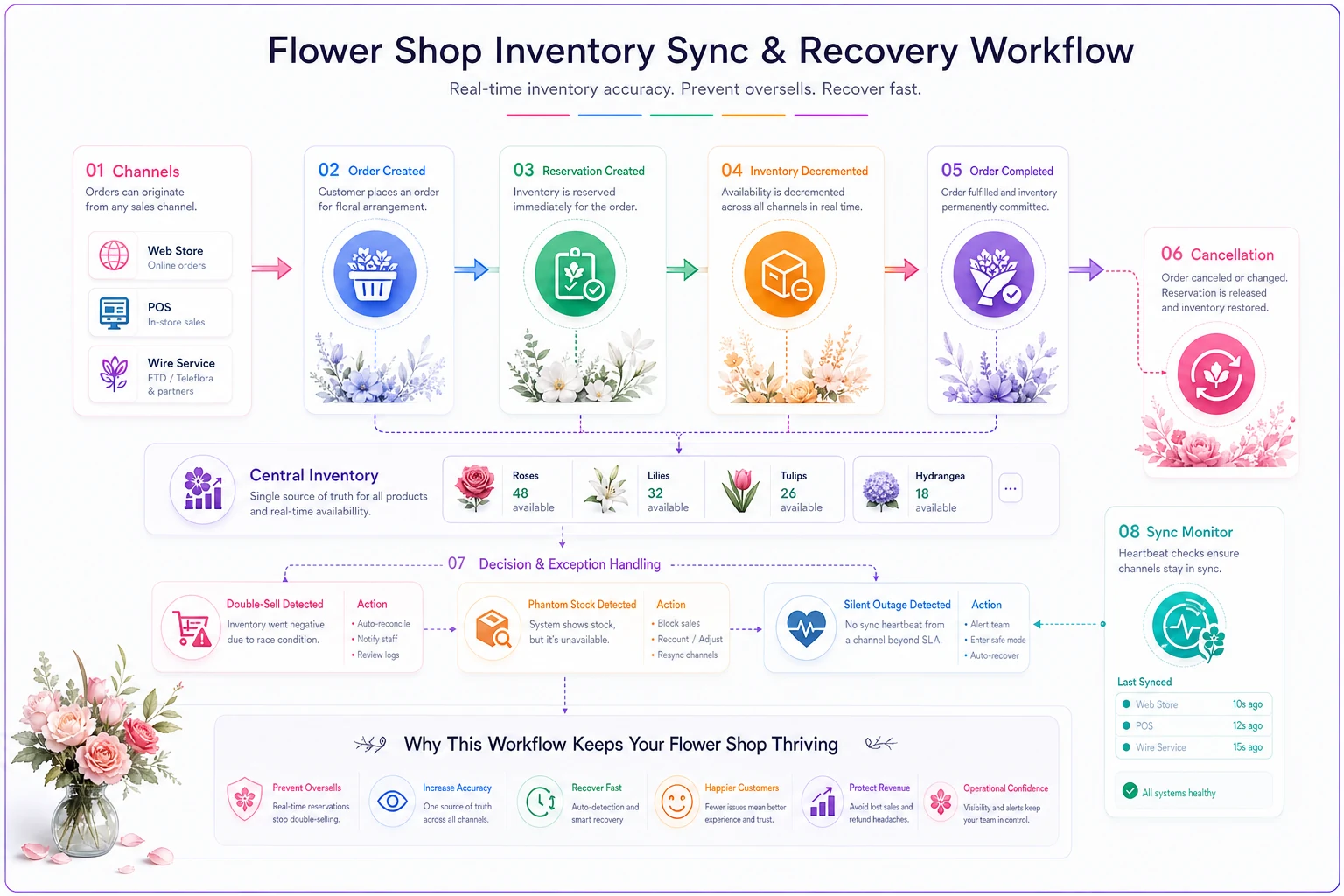
The diagram above maps the decision points — immediate decrement, reservation release, and heartbeat checks — to the three failure modes so you can see where to instrument checks.
[Order comes in on any channel] | v [Availability decrements immediately?] Yes / \ No / \ [Reservation [Double-sell window opens] created] | | v v [Failure Mode 1: Double-sell] [Cancellation/return flows back?] Yes / \ No / \ [Reservation [Phantom stock builds up] released] | | v v [Failure Mode 2: Phantom stock] [Sync heartbeat active?] Yes / \ No / \ [Drift caught [Silent outage, orders pile up] early] | v [Failure Mode 3: Silent outage]
The daily reconciliation checklist
None of the above works without a rhythm. A short daily reconciliation catches drift before it becomes a customer problem. Post this, assign an owner per shift:
Assign the morning check to whoever handled the previous shift's close so delivery counts and on-hand updates don't slip.
-
[ ] Morning
confirm delivery received matches what was ordered; update on-hand
-
[ ] Confirm every channel's "last synced" timestamp is current
-
[ ] Release any reservations tied to canceled orders from the previous day
-
[ ] Spot-check available count on your top 5 scarce/premium SKUs against physical count
-
[ ] Midday
quick re-check of scarce SKUs during peak order flow
-
[ ] End of day
reconcile fulfilled orders against reservations; flag mismatches
-
[ ] Log any double-sell or phantom-stock incident with SKU + channel
The end-of-day mismatch flag is the step people skip most, and the one that pays off most. A drift of two premium roses unaccounted for today is a warning. Ignored for a week, it's a pattern quietly costing you real product.
A real scenario: a two-location shop bleeding premium stems
A shop running a website, one wire service, and two physical locations kept running short on premium roses and peonies during peak weeks. They weren't under-ordering — a full stem count each morning matched what they'd received. The product was disappearing into sync gaps.
Two things were happening. Their web store displayed on-hand instead of available, so during busy mornings two or three orders would claim the same premium bunches before any wrote back. And cancellations refunded the customer but never released the reservation, so premium stems sat "reserved" and got dumped at end of day as shrink.
They made three changes: switched every channel to display available, forced availability to decrement immediately on any order, and added a nightly job that released reservations tied to canceled orders. Within a couple of billing cycles, double-sell apologies during peak weeks dropped from several a week to almost none, and premium-stem shrink fell noticeably — somewhere in the range of a few hundred dollars a month in recovered product, plus the harder-to-quantify cost of not having to upgrade angry customers for free.
Nothing exotic. They just stopped letting their systems tell two different stories.
When a tighter integration setup makes sense — and when it doesn't
When it's worth the effort: You're running three or more channels, you sell scarce premium items, and you have seasonal spikes. That combination is where sync failures cost the most, and where a proper reservation model earns its keep almost immediately.
When it's overkill: A single-channel shop doing mostly walk-in and phone with a simple POS workflow. Building out reservation states and nightly reconciliation for 12 orders a day is effort better spent elsewhere. Keep it simple until volume forces the issue.
Who should hold off: If your fulfillment workflow itself is chaotic — orders getting lost between intake and the design table — fix that first. Data integration sits on top of a working order flow; it can't compensate for a broken one. If that's where you are, the same-day order workflow guide is the better starting point.
How this connects to the rest of your operation
Your data model isn't an isolated tech concern — it feeds everything downstream. Accurate available counts drive what you can promise on same-day. Clean reservation release drives your shrink numbers. Reliable channel sync drives which orders you batch together for delivery, since you can't route what you can't confirm. When your route planning depends on a confirmed, accurate order set, the whole day runs smoother — which is exactly why the delivery routing heuristics work better when your order data is trustworthy to begin with.
Where AI-assisted operational software genuinely earns its place is in the boring, easy-to-forget parts: watching sync heartbeats and flagging a channel that's gone quiet, catching a reservation that never got released, surfacing an end-of-day mismatch before it becomes tomorrow's shortage. Those are the tasks a human at a busy counter reliably drops during peak season — and the ones where a system quietly doing the reconciliation in the background keeps your available counts honest across every channel. The point isn't to automate judgment. It's to make sure the drift gets caught while it's still small.
Closing thought
Sync failures feel like technology problems, but they're really coordination problems wearing a technology costume. The shops that stop losing orders aren't the ones with the fanciest integrations — they're the ones with a clear model of SKUs, locations, and reservations, a sync cadence matched to how fast staleness hurts them, and written recovery steps for the three ways it breaks.
Get those in place and the frantic cross-town runs for retail roses mostly disappear. Not because nothing ever breaks, but because you find out in minutes, while you still have room to fix it.
Sync failures feel like technology problems, but they're really coordination problems wearing a technology costume. The shops that stop losing orders aren't the ones with the fanciest integrations — they're the ones with a clear model of SKUs, locations, and reservations, a sync cadence matched to how fast staleness hurts them, and written recovery steps for the three ways it breaks. Get those in place and the frantic cross-town runs for retail roses mostly disappear. Not because nothing ever breaks, but because you find out in minutes, while you still have room to fix it.
Ready to grow your flower shop business?
Join 500+ flower shops using Blomsly to save time, reduce errors, and delight customers with fresh blooms.