

The trouble with a neighborhood offer isn't the offer itself. It's what happens on the back end when 60 people in the same three-mile radius all decide to redeem "20% off a spring bouquet" within the same 48-hour window — right when your cooler is already committed to two funerals and a Friday wedding.
Most florists run localized promotions the same way they'd run a general sale. Post it, boost it, hope demand lands somewhere reasonable. It rarely does. Localized demand clusters. It spikes hard in a narrow window and then disappears, which is the exact opposite of the steady, predictable pull your inventory cadence is built around.
This post is about one specific problem: how to run a neighborhood or zip-code offer without blowing through stems you already reserved for regular orders. We'll cover channel-cap rules to control how much demand a single promo can create, a short-run fulfillment playbook so those orders don't jam your bench, and a lightweight post-campaign template so you actually learn something instead of repeating the same mistake next season.
Why localized offers break inventory cadence specifically
A general promotion pulls demand from your whole customer base — spread across time and product. Someone sees it Tuesday, buys Thursday, picks a different bouquet than the next person. That natural spread is forgiving.
A localized campaign does the opposite. The audience is small, geographically tight, and hit with the same message at the same time. When you run "free delivery to the Riverside neighborhood this weekend," you're not stimulating broad demand — you're compressing a specific slice of it into a few days and funneling it toward one or two SKUs.
That compression is the core problem. Your ordering cadence assumes a certain daily draw on your cooler. Roses turn at a predictable rate, greens get reordered on a schedule, accessories sit at safety stock. A neighborhood spike doesn't respect that rhythm. It pulls 40 units of one recipe over a weekend when your buy plan assumed maybe 12. And the part that catches people off guard: the stems you burn on the promo were already spoken for. That "20% off" bouquet uses the same garden roses you set aside for a Saturday wedding. The promo doesn't create new inventory — it competes with committed orders for space in the same cooler.
The core fix: channel-cap rules
A channel cap is a hard limit on how much a single promotional channel can sell before it shuts off or switches to backorder. Not a suggestion. A limit tied to real inventory you're actually willing to give up.
Never miss a bloom or a delivery.
Blomsly helps you manage orders, track stock, and schedule deliveries effortlessly.
- Unified order management
- Real-time inventory tracking
- Delivery scheduling & notifications
No credit card required
The mistake most shops make is capping by budget instead of by units. "We'll spend $200 on the ad" — but nobody says "this offer can only fulfill 25 bouquets." Ad spend controls reach. It does not control redemption. You can spend $200 and get 15 orders or 55 orders depending on the weather and the day. Only a unit cap protects your cooler.
-
Start from your committable surplus, not your total stock. Look at the promo window. Subtract everything already reserved — standing orders, subscriptions, event work, wire-service reservations, your normal walk-in baseline. Whatever's left is the only inventory the promo is allowed to touch.
-
Convert surplus stems into finished-unit caps. If your promo bouquet uses 9 stems of a specific rose and you have 220 uncommitted stems, your ceiling is roughly 24 units — before you factor in greens or vase supply. Cap to the tightest ingredient, not the most abundant one.
-
Set the cap 10–15% below that ceiling. Leave a buffer for shrink, a miscount, or a bruised batch. If the math says 24, cap the offer at 20.
-
Tie the cap to a real stop mechanism. A countdown, a limited-quantity setting on the product page, or a manual "sold out" toggle someone is actively watching. A cap you can't enforce is just a wish.
When the offer hits its unit ceiling, it turns off — before it starts eating into orders you've already promised someone else.
Capping across multiple channels at once
The uglier version of this problem shows up when the same offer runs on your website, your Instagram, and a printed flyer stuffed into a neighborhood mailer — simultaneously. Each channel pulls from the same cooler, but none of them know about the others.
Three separate faucets draining one tank. The website hits its cap, but flyer redemptions keep coming in by phone because nobody told the front counter the offer was full.
The fix is a single shared counter, not three. Every redemption — web, phone, walk-in — decrements the same number. If you've thought about how demand moves between sales channels before, this is that same discipline applied to a short promo window. Our deeper breakdown of omnichannel channel allocation covers how to keep channels from cannibalizing each other — a channel cap is essentially that idea shrunk down to a single campaign.
A short-run fulfillment playbook
Capping protects your inventory. It doesn't protect your bench. A cluster of 20 identical orders landing over one weekend can still wreck your design flow if you treat them like 20 unrelated same-day builds.
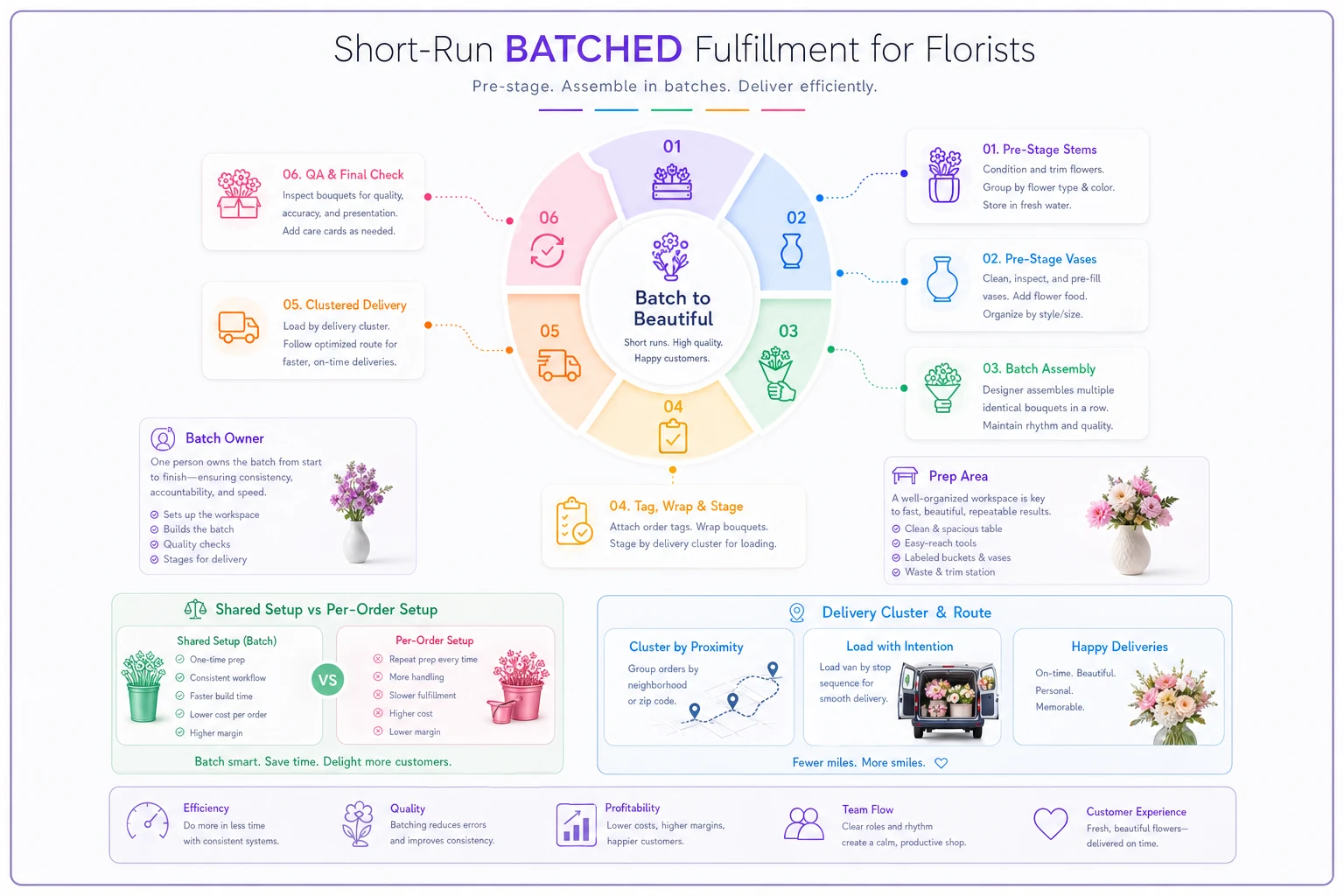
Lock the recipe. A promo bouquet should be one fixed recipe — same stems, same count, same vase, no substitutions at checkout. The moment you let customers tweak a promo order, you lose the batching advantage and it becomes 20 custom builds.
Pre-stage by the campaign window, not by order. If the offer runs Friday–Sunday for Saturday pickup, prep your stems Friday afternoon for the whole known batch. Process the roses once. Cut the greens once. Set out vases in a row.
Assign a batch owner. One designer runs the promo from start to finish instead of it getting sprinkled across whoever's free. Consistency goes up, and the rest of the bench stays on regular orders without constant interruption.
Slot deliveries into your existing neighborhood route. This is the quiet upside of a localized offer — every order is in the same area. Don't dispatch them one by one. Roll them into one tight run.
Here's a quick visual of the batched fulfillment workflow.
Here's the difference in practice:
| Approach | Prep time per unit | Bench disruption | Delivery efficiency |
|---|---|---|---|
| Treating promo orders as normal same-day | Full per-order setup | High — interrupts custom work all weekend | Poor — scattered dispatch |
| Batched short-run fulfillment | Shared setup across the batch | Low — isolated to one owner | Strong — one clustered route |
The batched version isn't just faster. It keeps the promo from bleeding into the work that pays full margin.
The scenario this actually plays out in
A neighborhood shop ran a "$45 spring jar, free local delivery" offer to around 900 households across two adjacent zip codes. No cap. They budgeted the ad spend and figured demand would sort itself out.
It didn't. About 50 orders came in over three days. The promo bouquet shared its focal flower with a wedding booked for that Saturday. By Friday afternoon they were short, scrambling a spot order at a bad price, and the bride's centerpieces got a last-minute substitution nobody was happy about. The promo itself "sold well" on paper — but they lost margin on the rush buy, annoyed a wedding client, and a few walk-ins left empty-handed.
The next month they ran a nearly identical offer with a hard cap of 22 units, priced from committable surplus only, batched into a single Saturday prep run and one delivery route. It sold out in about a day and a half. No spot orders, no wedding conflict, the whole run prepped in one sitting. Same offer, roughly the same promo revenue — but this time it didn't cost them anything on the other side of the shop.
The offer wasn't the difference. The cap and the batch were.
Post-campaign learn template
Most shops never close the loop. The promo ends, they eyeball whether it "did okay," and move on. Then they run the same thing next season and hit the same wall.
Keep a short record — five minutes after the campaign ends, not a formal report. Capture:
-
Cap set vs. cap hit — did you sell out, and how fast?
-
Actual stems consumed vs. estimated — was your per-unit recipe count accurate?
-
Committed-order conflicts — did the promo touch anything reserved? Any near-misses?
-
Spot-buy events — did you have to buy outside your plan, and what did it cost?
-
Redemption timing — when in the window did orders cluster?
-
Delivery clustering — did the orders route as tightly as you expected?
The single most useful number here is redemption timing. Localized offers almost always front-load — most orders land in the first third of the window. Once you know that pattern, you can prep earlier and cap tighter, because you'll know by day one whether you're going to sell out. That timing data also feeds directly into how you think about repeat buyers — the customer lifecycle playbook covers turning a one-time promo redeemer into someone who comes back at full price.
When channel-caps make sense — and when they don't
Caps are worth the effort when the offer is narrow: one neighborhood, one recipe, a tight window, shared inventory with committed work. That's exactly the situation where uncontrolled demand does damage.
When it's overkill: a slow-season, storewide "10% off everything" with no featured SKU and plenty of cooler slack. Nothing concentrated to protect, so a hard cap just adds friction with no upside.
Who should skip localized offers entirely for now: if you don't yet have a clear read on what's committed versus what's free in your cooler at any given moment, don't run a capped neighborhood promo. You'll be capping against a number you can't trust. Get your committed-versus-available picture solid first — even a whiteboard version — then run the offer. A cap built on a bad inventory count is worse than no cap, because it gives you false confidence.
Keeping the moving parts straight
The reason localized campaigns break cadence isn't complexity — it's that the cap, the committed inventory, and the redemption counter all live in different places. The ad platform knows spend. The POS knows sales. The design bench knows what's reserved. Nobody's looking at all three at once, which is how a promo quietly eats a wedding's worth of roses before anyone notices.
Pull committed inventory, the redemption counter, and ad spend into one shared view so the cap enforces itself instead of relying on someone to flip a switch.
Wherever you can pull those pieces into one view — so a redemption automatically ticks down against real available stock and the offer flips to sold-out when it hits the cap — you remove the manual watching that always fails on a busy Saturday. Whether that's a spreadsheet you actually maintain or a management platform tracking committed versus available inventory in real time, the goal is the same: the cap enforces itself instead of relying on someone remembering to flip a switch mid-rush.
Run one small capped offer this way, keep the learn template, and by the third campaign you'll be sizing caps almost by feel — because you'll finally have the numbers to back the gut call.
Ready to grow your flower shop business?
Join 500+ flower shops using Blomsly to save time, reduce errors, and delight customers with fresh blooms.