

There's a specific kind of chaos that shows up in shops running more than one designer. A customer orders your "Garden Romance" bouquet. Designer A builds it with garden roses, ranunculus, and Italian ruscus. Designer B — working the next shift — builds the same named product with spray roses, lisianthus, and a touch of eucalyptus. Both look nice. Both cost roughly the same in labor. But they're not the same product, and the customer who got the second one now thinks you're inconsistent.
This isn't a talent gap. It's a version control gap. And in floral shops, where recipes change with the seasons, with supplier availability, and with whatever the owner tweaked last Tuesday, floral design kit version control is one of the most overlooked operational systems in the entire shop.
The frustrating part is that the confusion rarely announces itself. Nobody stops mid-build to say "wait, which version of this recipe is current?" They just build from memory, from a printout taped to the cooler that's four months old, or from a photo on their phone from a wedding that used a completely different palette. The result drifts slowly, and by peak season the drift is expensive.
Why recipe versions drift in the first place
The root cause is almost always that recipes live in too many places at once, and none of them is clearly labeled as the source of truth.
-
A laminated card in the design station
-
A note in the POS product description
-
A spreadsheet the owner built two springs ago
-
A group text where someone said "we're swapping ranunculus for spray roses until Friday"
-
Muscle memory in whoever's been there longest
When a stem goes out of season or a supplier can't fill an order, someone makes a substitution. That substitution is smart and necessary. The problem is that it usually doesn't get written down anywhere permanent. So now the real recipe and the documented recipe have quietly split. Multiply that across 30 or 40 named products and two seasonal swaps a year, and you've got dozens of undocumented forks running in parallel.
The drift accelerates fastest right when you can least afford it — the two weeks before Valentine's Day and the run-up to Mother's Day. That's when temp designers come in, when substitutions happen hourly, and when nobody has time to update the card taped to the cooler.
The real cost isn't the flowers — it's everything downstream
Procurement gets thrown off. If your documented recipe still calls for garden roses but half your designers have quietly switched to spray roses, your ordering is built on the wrong assumptions. You over-order one stem and run short on another. Your purchase quantities stop matching what actually gets consumed on the bench.
Never miss a bloom or a delivery.
Blomsly helps you manage orders, track stock, and schedule deliveries effortlessly.
- Unified order management
- Real-time inventory tracking
- Delivery scheduling & notifications
No credit card required
Costing goes fuzzy. When the recipe on paper and the recipe in practice differ, your margin math is wrong on the products you sell most. You think "Garden Romance" carries a certain flower cost, but the real builds are running higher or lower, and you won't catch it until you audit.
Training slows down. A new hire can't learn a product that exists in five conflicting forms. They ask a question, get one answer from one designer and a different answer from another, and lose confidence in the whole system.
Customer trust erodes quietly. Nobody complains about the first inconsistent bouquet. They just don't reorder the exact thing, or they mention offhand that "it looked different last time." That's the drip you don't see on any report.
Here's a rough picture of how a version problem plays out over a season:
| Symptom | What it looks like on the bench | What it actually costs |
|---|---|---|
| Undocumented substitution | Designer swaps a stem, tells no one | Procurement orders the wrong stem next cycle |
| Multiple recipe copies | Cooler card, POS note, and spreadsheet all differ | Two designers build two different products |
| No rotation date | "Spring recipe" still running in July | Wilting-prone stems ordered out of season |
| No archive | Last year's Mother's Day recipe is lost | You rebuild from scratch every year |
None of these lines is dramatic on its own. Stacked over a busy quarter, they add up to real margin leakage and a steady, low-grade confusion that makes the whole shop feel harder to run than it should.
Version rules: make one recipe the truth, and stamp it
The fix starts with a boring but powerful idea borrowed from software teams: every recipe gets a version number and a date, and only one version is "live" at a time.
-
One source of truth. Pick the single place a recipe officially lives. Everything else — the cooler card, the POS note — is a copy that must match the source, not a competing version. If the cooler card and the source disagree, the source wins, and the card gets replaced.
-
Every change gets a version bump. When you swap a stem, adjust a count, or change the vase, the recipe version changes. "Garden Romance v3 (updated 3/14 — spray roses replace garden roses for spring)." The version tells anyone glancing at it whether they're looking at current or stale info.
-
Changes are dated and signed. Whoever made the change puts their initials and the date on it. This isn't about blame — it's so that three weeks later, when procurement asks "why are we suddenly ordering spray roses," there's an answer instead of a shrug.
The version note itself should be short enough to read in five seconds. A recipe header that reads "Garden Romance — v4 — live as of 4/2 — retire 6/15" tells a designer everything they need before they ever look at the stem list.
Put the version header and retirement date at the very top of the recipe card so it's impossible to miss.
If you've already built standardized products, this layers right on top. Shops that have invested in prebuilt package SKUs to cut designer decision time have a head start here — those SKUs just need version stamps and rotation dates added to become fully controlled.
The rotation calendar: plan swaps before availability forces them on you
Version rules keep a recipe consistent. A rotation calendar keeps it current. The two work together.
Most shops rotate recipes reactively — a stem disappears from the supplier list, so someone scrambles to substitute. A rotation calendar flips that. You decide in advance, on a calendar, when each recipe family shifts and to what.
-
Late winter / early spring ranunculus, tulips, anemones come into play
-
Late spring / summer peonies (short window), garden roses, dahlias later
-
Fall textured, muted palettes; dahlias, chrysanthemums, seasonal greens
-
Winter / holiday amaryllis, evergreens, deeper reds and whites
For each named product, the calendar lists which recipe version is live in which window. "Garden Romance" might run v4 in spring, v5 in summer, and revert to a winter version in December. Each version is pre-built and pre-priced before the window starts, not improvised when a truck shows up short.
A rotation calendar isn't just a design tool — it's a procurement tool. When you know in advance that you're switching from garden roses to spray roses on April 2nd, your ordering can shift on schedule instead of lurching. Your purchase quantities line up with what the bench will actually consume. This gets especially important heading into the crunch periods covered in the peak-season operations playbook, where a locked-in rotation removes one more thing to figure out on the fly.
A quick visual of the rotation workflow helps the team see when versions switch.
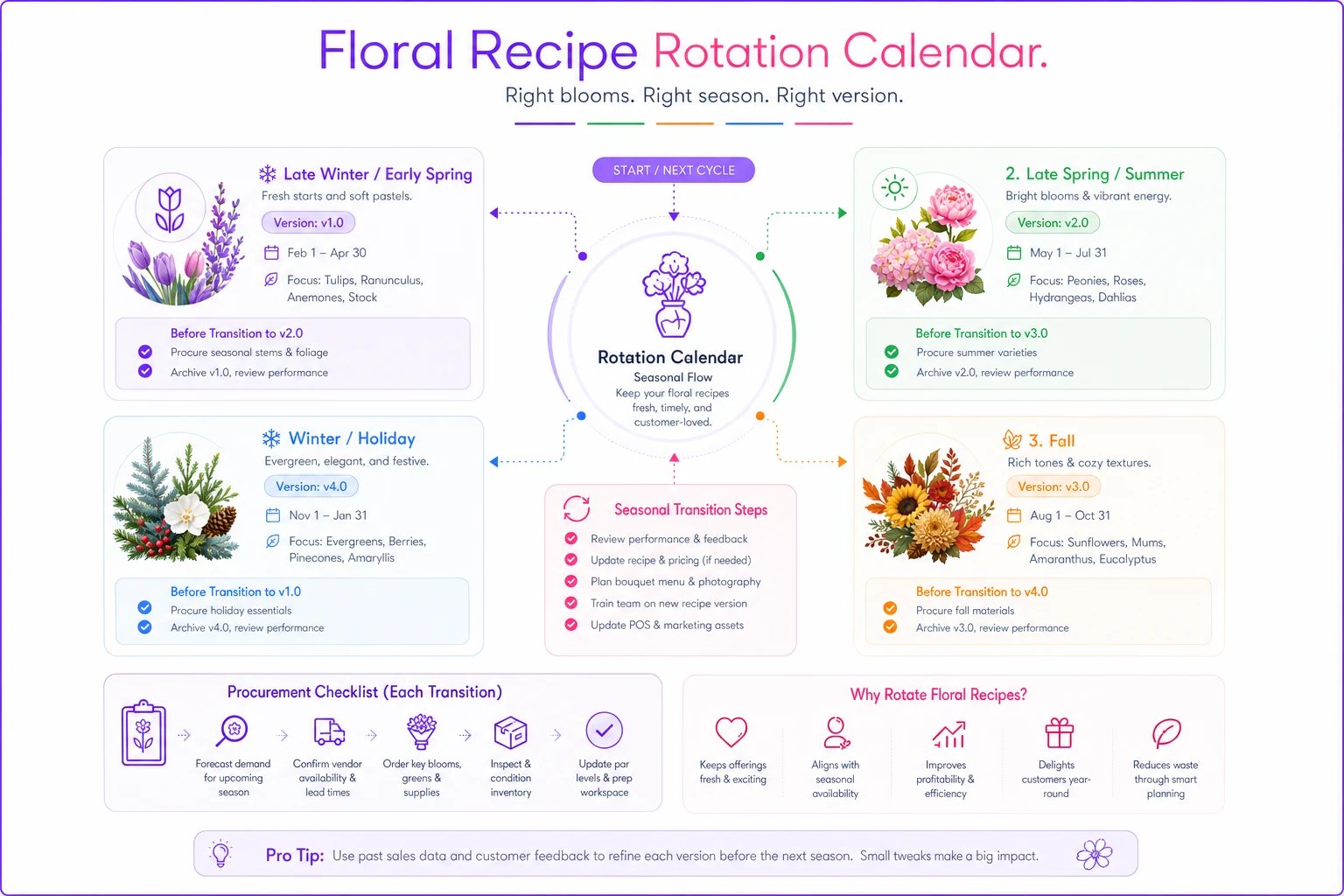
A rotation calendar isn't just a design tool — it's a procurement tool that keeps ordering aligned with the bench instead of reacting to shortages.
Archive processes: stop rebuilding last year from memory
The third piece is the one almost every shop skips, and it's the cheapest to fix.
When a recipe version retires, it doesn't get deleted — it gets archived. That means the full recipe, the version number, the dates it ran, the flower cost at the time, and ideally a photo, all get saved somewhere you can find them next year.
-
The full recipe (stems, counts, greens, container, mechanics)
-
Version number and the date range it was live
-
Flower cost and sell price at the time
-
A photo of a correct build
-
A one-line note on why it retired ("peonies out of season" / "garden rose price spiked")
That last note is worth more than it looks. It's the difference between "let's run this again" and "let's run this again but skip the peonies because they killed our margin last June."
The one-page kit-change checklist
Here's the piece that ties procurement, recipes, and archiving together every time a recipe changes. Print it. Keep it at the design station. Nobody changes a live recipe without running through it.
Before you change a live recipe, confirm:
-
- [ ] Source updated first. The change is made on the source-of-truth copy, not just the cooler card.
-
- [ ] Version bumped. New version number assigned (e.g., v4 → v5).
-
- [ ] Dated and initialed. Who changed it and when is written on the recipe.
-
- [ ] Reason logged. One line
why the change happened (substitution, seasonal, cost, request).
-
- [ ] Procurement flagged. Whoever orders knows the stem list changed so next PO reflects it.
-
- [ ] Cost re-checked. New flower cost calculated; sell price confirmed or adjusted.
-
- [ ] Copies replaced. Old cooler cards / printouts pulled and swapped for the current version.
-
- [ ] Photo updated. A correct build of the new version is photographed for reference.
-
- [ ] Old version archived. The retired version is saved with its dates, cost, and retirement note.
-
- [ ] Team notified. Designers on other shifts know the new version is live as of today.
Ten checkboxes. Two minutes. It's the two minutes that prevents the next month of "why does this look different than last time."
A quick real scenario
A two-designer shop doing roughly $30k–$35k a month in arrangements kept getting occasional callbacks on repeat orders — customers noticing their "usual" bouquet looked off. Nothing catastrophic, maybe a handful a month, but enough to notice. On top of that, their spring stem orders never quite matched consumption; they'd end up short on spray roses and long on garden roses, wasting a chunk of each order.
The problem, once they dug into it, was exactly this: their top eight recipes each existed in two or three undocumented versions, and substitutions were happening on the bench without anyone updating the ordering assumptions.
They spent about half a day stamping their eight core recipes with version numbers, building a simple four-window rotation calendar, and taping the kit-change checklist to the design station. Nothing more complicated than a shared spreadsheet and some laminated cards.
Over the next couple of months, callbacks on repeat orders essentially stopped, and the spring stem mismatch shrank enough to matter on the monthly flower cost. Their over-order on garden roses dropped noticeably. No new software, no new hires. Just a source of truth, version stamps, and a two-minute discipline before any recipe changed.
Where lightweight systems help — and where they don't
For a lot of shops, a shared spreadsheet plus laminated cards is genuinely enough. If you have one or two designers and a stable product list, don't overbuild this.
Where it starts to strain is when you're running 30+ named products, multiple shifts, and seasonal rotations that touch procurement. At that scale, keeping recipe versions, rotation dates, and purchase quantities in sync by hand gets fragile — someone forgets to update the ordering side after a swap, and the drift returns. This is where an operational platform that links your recipes, versions, and purchasing in one place earns its keep, because a version change on a recipe can flow straight into what gets ordered, instead of relying on someone remembering to flag it. But that's an efficiency upgrade, not a prerequisite. The discipline comes first; the tooling just makes the discipline easier to hold onto.
Worth saying clearly: this whole system is a bad idea if you're a solo designer building everything yourself from your own head, with no substitutions and no seasonal churn. Version control solves a coordination problem. If there's no one to coordinate with, you're adding overhead for nothing.
Recipe drift isn't a sign your designers are careless. It's a sign your recipes never had a controlled way to change.
Give each one a version number, a rotation date, and an archive slot, and put a two-minute checklist between anyone and a live recipe. Do that, and the "why does this look different than last time" problem — along with the procurement mismatches hiding behind it — mostly disappears on its own.
Ready to grow your flower shop business?
Join 500+ flower shops using Blomsly to save time, reduce errors, and delight customers with fresh blooms.