
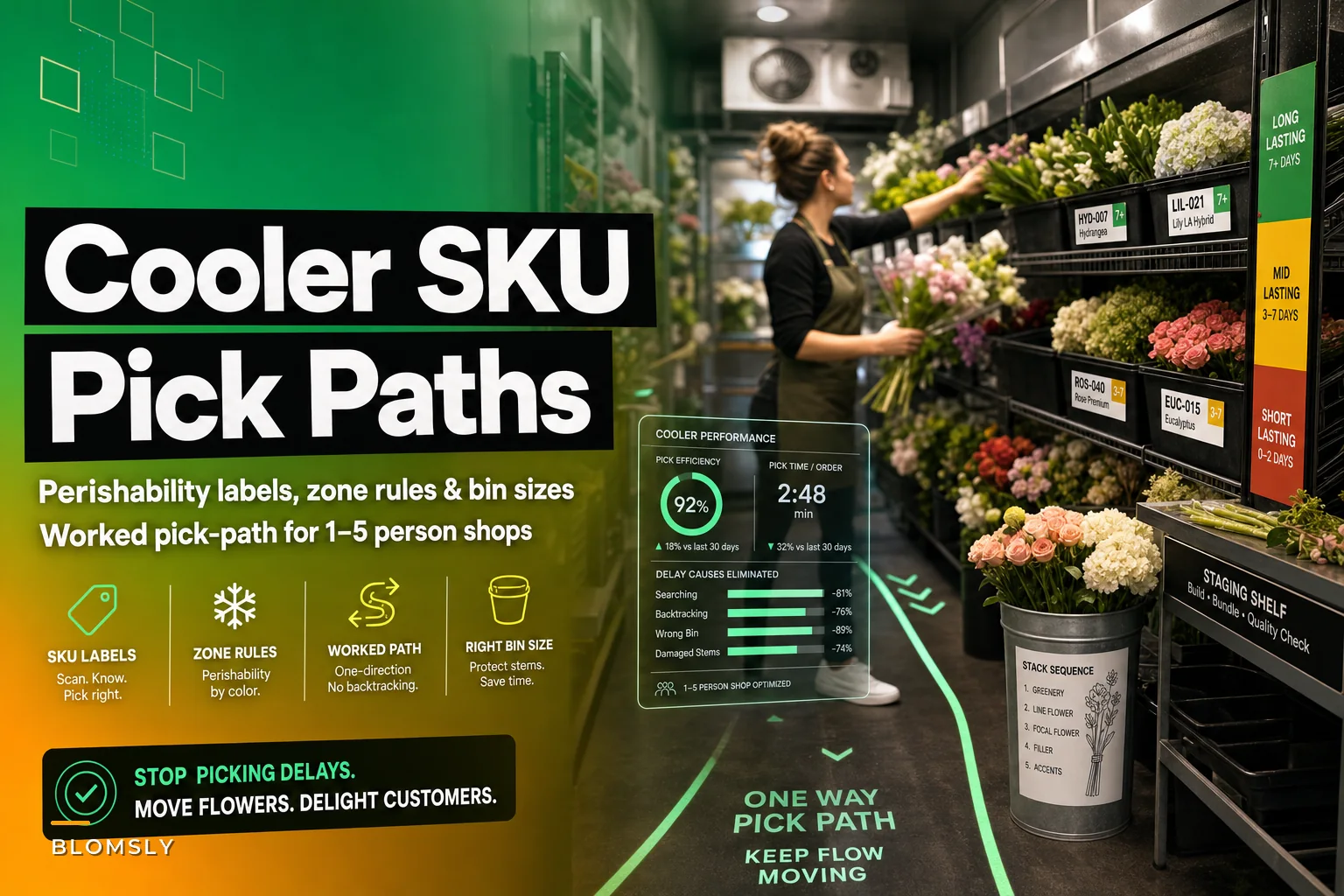

The cooler is where most small flower shops quietly lose time. Not on the sales floor, not at the design bench — inside the cooler, where a designer stands with a clipboard order, scanning shelves for the right stems, moving buckets, knocking over the eucalyptus, and pulling three ranunculus from a bucket that should've been rotated out two days ago.
For a shop with 1–5 people, this isn't a minor annoyance. When one person is both answering the phone and building arrangements, every extra minute inside the cooler is a minute the front counter is unstaffed. And the picking chaos does something worse than waste time — it damages product. Stems get crushed when buckets are shuffled. Delicate blooms get bruised because someone reached past them four times looking for something else.
This post is about one specific fix: a floral SKU labeling pick path system built for tiny teams. Label schema by perishability, physical cooler zones, bin sizes matched to how fast a SKU moves, and a worked pick-path that keeps designers moving in one direction. No broad inventory theory — just the physical layout and labeling that makes picking fast and clean.
Why picking goes wrong in small coolers specifically
Big operations solve this with dedicated pickers and warehouse software. Small shops can't. In a 3-person shop, the same hands do intake, processing, design, and picking, so the cooler layout gets built by accident — whatever bucket was empty when the delivery arrived is where the roses went that week.
-
Stems are grouped by color or "vibe," not by how they're picked. Looks pretty. Terrible for speed, because a single order pulls from ten scattered spots.
-
No perishability signal on the bucket itself. The designer can't tell at a glance which hydrangea bucket is on day 5 versus day 2, so they grab from the front and the older stems die in the back.
-
Bins are all the same size. Your fastest-moving greens sit in the same footprint as a specialty orchid you sell twice a month, so high-volume SKUs run out of front-facing space and get double-stacked.
The core issue is that the cooler is organized for storage when it needs to be organized for retrieval. Those are different goals. Storage cares about fitting everything in. Retrieval cares about the path your body takes to pull an order without backtracking or reaching over fragile product.
If you haven't already sorted out how you classify SKUs by lifecycle and turnover, that work comes first — the lifecycle rules for perishable floral inventory piece covers how to group SKUs before you ever touch the physical layout. This post assumes you've got rough SKU classes already.
The label schema: perishability first, then SKU class
Labels do two jobs at once. They tell you what something is and how urgent it is. Most shops only label the "what." Adding a perishability signal is the highest-value change you can make, and it costs almost nothing.
Never miss a bloom or a delivery.
Blomsly helps you manage orders, track stock, and schedule deliveries effortlessly.
- Unified order management
- Real-time inventory tracking
- Delivery scheduling & notifications
No credit card required
[Perishability band] — [SKU code] — [Received date]
The perishability band is a color plus a letter. Three bands is all you need:
| Band | Color | Meaning | Typical SKUs |
|---|---|---|---|
| P1 | Red | Pull first, dies fast | Open garden roses, dahlias, poppies, most soft-headed blooms |
| P2 | Yellow | Mid-life, watch it | Standard roses, lisianthus, alstroemeria, tulips |
| P3 | Green | Sturdy, long vase life | Carnations, chrysanthemums, most greens, eucalyptus |
The color does the heavy lifting. A designer scanning the cooler sees red and knows: use this before it's gone. It also makes rotation obvious without checking dates on every stem. When two buckets of the same rose sit side by side, the one with the older received date gets pulled first — and the label makes that a half-second decision instead of a "which one's older?" hunt.
Worth flagging: don't over-engineer the bands. Some shops try five or six perishability tiers and nobody can remember the middle ones. Three is enough for a small team to internalize in a week.
Cooler zones: build the layout around pick frequency
Once labels carry perishability, the physical zones should carry frequency. The stuff you touch on almost every order goes closest to the cooler door and at waist-to-chest height. Specialty items go deeper and higher or lower.
-
Zone A (door, waist height) Your workhorse SKUs — greens, filler, and 3–4 core flowers that appear in most arrangements. These get the most bin space and the easiest reach.
-
Zone B (middle, waist to eye) Secondary flowers and seasonal focal blooms. Still frequent, but not every order.
-
Zone C (back or bottom) Specialty and low-volume SKUs. Orchids, unusual textures, one-off wedding orders. You accept a longer walk here because you go there rarely.
-
Staging shelf (near door) Prepped bunches and pre-counted stems for the day's known orders. Nothing lives here permanently — it's a launch pad.
The mistake shops make is putting the prettiest or most expensive flowers front and center because it feels right. But expensive doesn't mean frequent. A $12/stem orchid you sell twice a week doesn't deserve prime real estate that your $0.90 ruscus needs ten times a day.
There's also a damage angle to zoning. Soft P1 blooms should never sit behind something you reach past constantly. If your dahlias are in Zone C and you're brushing past them to grab greens, you'll bruise them every trip. Put fragile, high-value P1 stems where hands aren't constantly moving — a low-traffic pocket at chest height, clearly labeled red.
Bin sizes by SKU class
Uniform bins waste space and slow picking. Match the bin footprint to how the SKU moves.
-
High-frequency, high-volume (core greens, filler) Largest bins, front-facing, single-depth so you never dig. If it's double-stacked, you're reaching behind the front row and crushing stems.
-
High-frequency, moderate-volume (core roses, standard focal) Medium bins, front-facing, arranged so two received-date batches sit side by side for easy rotation.
-
Low-frequency, low-volume (specialty) Small bins or shared buckets in Zone C. Fine to cluster a few SKUs together since you pick them rarely.
-
Fragile P1 regardless of volume Slightly oversized bins with breathing room. Cramming soft blooms tight is where a lot of shrink hides — heads touch, bruise, and get tossed.
The counterintuitive part: your bin sizing should sometimes waste a little cooler space on purpose. Giving fragile stems extra room looks inefficient but saves more in reduced damage than the space costs. If you want the deeper logic on how order quantities per SKU class feed into how much you should even be holding, the order-quantity rules for mixed-perishability florals breakdown pairs directly with this — bin size only makes sense once you know your typical on-hand quantity per SKU.
A worked pick-path for a single order
A pick-path is the fixed route a designer walks to fill an order without backtracking. In a small cooler it feels almost silly to formalize, but the difference between a random walk and a fixed path is real minutes per order, multiplied across a busy Saturday.
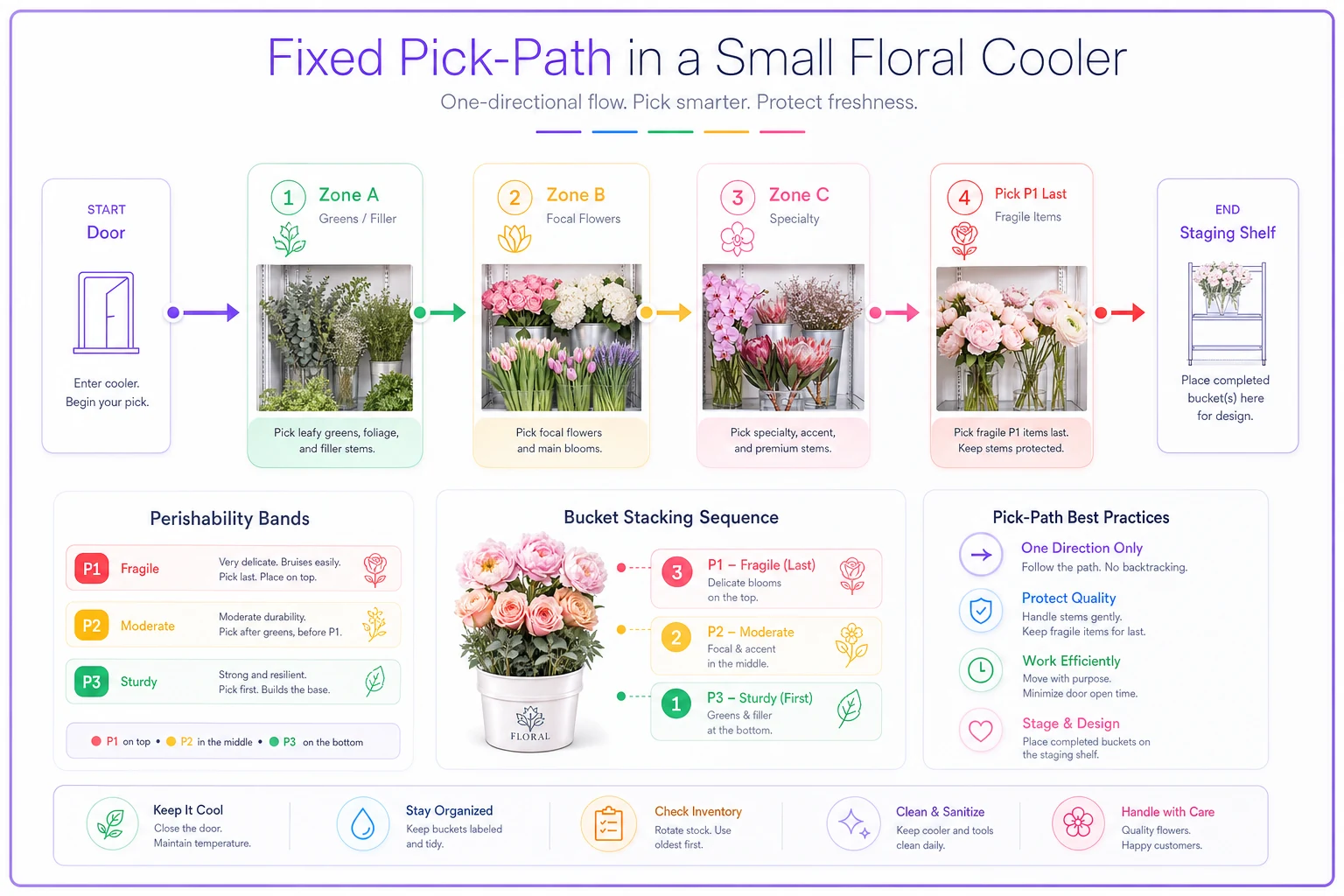
The principle: always move in one direction, pull perishable-first within each stop, end at the staging shelf.
-
Start at the door, grab the order ticket and a bucket. The ticket lists SKUs grouped by zone, not by how they appear in the arrangement.
-
Zone A first (greens/filler). Pull the sturdy P3 base — ruscus, eucalyptus — into the bucket. These take the crushing on the bottom, protecting softer stems above.
-
Zone B next (focal flowers). Pull P2 roses or lisianthus. Check received-date labels, take the older batch.
-
Zone C last, only if the order needs it. Grab the specialty stem, place it on top where nothing presses it.
-
P1 fragile pickup on the way back. If the order includes soft blooms, pull them last so they spend the least time being jostled, and lay them across the top.
-
End at the staging shelf. Set the bucket down, mark the ticket, move to the bench.
The key detail is ordering pulls so sturdy stems go in first and fragile stems go in last and on top. Most damage in small-shop picking happens because a designer grabs the pretty dahlia first, then buries it under greens. Flip that order and a chunk of your bruising disappears.
For picking tickets, group the SKU list by zone, then by perishability within the zone. If your order-management system prints tickets in the sequence someone actually walks, that alone shaves time — no more reading a ticket top-to-bottom that sends you across the cooler and back three times. This is a small place where a workflow platform that lets you customize pick-ticket sort order quietly earns its keep, without anyone thinking about "software."
Here's a simple diagram of the pick-path workflow.
This is a small place where a workflow platform that lets you customize pick-ticket sort order quietly earns its keep, without anyone thinking about "software."
Real scenario: a two-designer shop before and after
A two-person shop doing mostly daily arrangements and a handful of same-day deliveries was losing the better part of the morning to cooler chaos. The cooler was organized by color family, no perishability labels, uniform bins, and every designer walked their own random route.
The measurable problems: picking a standard mixed bouquet took roughly 6–8 minutes of cooler time once you counted the backtracking and the "where did we put the stock?" hunts. Damage from crushing and over-handling was running higher than it should — they were tossing a noticeable amount of soft blooms each week that had died in the back of buckets, unseen.
They rebuilt around zones and the three-band label schema over a slow week. Nothing fancy — colored tape for perishability, a zone map taped to the cooler wall, bins resized so core greens got single-depth front space and dahlias got breathing room.
After a couple of weeks of the team adjusting to the new layout, cooler pick time dropped to somewhere around 3–4 minutes per standard order. The bigger win was shrink: with red-labeled P1 buckets impossible to ignore, they started using older soft stems before they died, and weekly waste on those categories fell by a meaningful margin — enough that the owner noticed it in the monthly numbers without running a formal report.
None of that came from buying anything expensive. It came from organizing the cooler for retrieval instead of storage.
When this is worth it — and when it isn't
This level of structure makes sense when:
-
You're regularly filling more than a handful of orders a day and cooler time is genuinely part of your bottleneck.
-
You carry enough SKU variety that people hunt for things.
-
You're seeing shrink from soft blooms dying unseen in the back.
It's probably overkill if you're a one-person operation carrying maybe 15–20 SKUs total and you know exactly where everything is by muscle memory. At that scale, a fixed pick-path adds ceremony without saving much. Add the perishability labels — those help everyone — but skip the formal zoning until your SKU count and order volume grow.
Also, don't roll this out during your busiest week. Rebuild the cooler on a slow day, walk the team through the path once, and let it settle before peak. Trying to relearn your cooler layout on a Valentine's rush will cost you more than the disorganization ever did.
The one habit that keeps it working
The system decays the moment someone restocks lazily. A delivery comes in, it's chaotic, and stems get shoved wherever there's room — right band, wrong zone, or no label at all. Two weeks of that and you're back to random walks.
The single habit worth enforcing: intake follows the same map as picking. When product comes in, it gets a perishability label and goes into its zone bin, front-facing, with the new received date placed behind the old batch so rotation stays honest. That's five extra minutes at intake that protects every pick for the rest of the week.
Keep a simple intake checklist by the cooler door so received-date labeling and front-facing placement happen before any stems go into bins.
A cooler organized for retrieval doesn't just pick faster — it tells you the truth about what's aging, keeps fragile stems out of harm's way, and lets a two-person team move like a bigger one. The labels and the path are cheap. The time and the wasted blooms they save are not.
A cooler organized for retrieval doesn't just pick faster — it tells you the truth about what's aging, keeps fragile stems out of harm's way, and lets a two-person team move like a bigger one. The labels and the path are cheap. The time and the wasted blooms they save are not.
Ready to grow your flower shop business?
Join 500+ flower shops using Blomsly to save time, reduce errors, and delight customers with fresh blooms.