


Most double-sell disasters don't happen because someone was careless. They happen because three different people, looking at three different screens, all believed the same bunch of garden roses was available at 2:14 PM on a Friday. The walk-in customer paid cash. The website checkout went through. And the wire order came in through your service dashboard — all within about four minutes of each other.
This piece is built to sit alongside the broader rules in Prevent double-sells: wire-service reservation, pricing and fulfillment rules for small shops. That article covers the why and the policy logic. This one is the do-this-now layer: exact timings, a tie-break matrix you can argue with, a named-role recovery SOP, and the boring engineering details that actually keep inventory honest. Copy what you need straight into your SOP doc.
The 7-step operational checklist (paste this into your SOPs)
Here's the core checklist, written so a shop manager can drop it in with minimal editing. Fill in the bracketed values with your own numbers.
-
Single source of truth is declared. Every channel — walk-in POS, web store, wire dashboard — writes to and reads from one inventory record. If any channel can only read a stale copy, that channel gets a hard reservation hold instead of a live count. Verify this at open.
-
Reservation holds are mandatory before payment. No item moves to checkout on any channel without placing a time-boxed hold. A hold is not a sale — it's a lock. Default durations are in the next section.
-
Scarce SKUs are flagged daily. At open, the opening lead marks any SKU with on-hand ≤ [3 units] as "scarce." Scarce SKUs get shorter holds and tighter channel priority (covered below).
-
Walk-in sales are logged within 60 seconds. The single biggest gap in small shops: a cash walk-in sale that doesn't hit the system for 20 minutes. The ring-up is the inventory update, not something you do when things quiet down.
-
Channel priority tie-break is posted at the counter. When two channels want the last unit, staff don't improvise. They follow the matrix. Print it. Laminate it. Tape it near the register.
-
Sync health gets a visual check twice a day. Opening lead and closing lead each confirm the "last sync" timestamp on every channel is within threshold (see monitoring section). If it's stale, switch to manual reservation mode immediately.
-
Every near-miss gets a one-line log. When two orders almost collided, the person who caught it writes a single line: date, SKU, channels involved, how it was resolved. This log is your drill material and your early-warning system.
That's the spine. The rest of this article makes each step precise enough to actually enforce.
Default reservation durations (with configurable ranges and rationale)
A reservation hold is only useful if it expires at the right time. Too long and your inventory looks sold-out when it isn't. Too short and a customer loses the item while they're still typing in their card number.
Never miss a bloom or a delivery.
Blomsly helps you manage orders, track stock, and schedule deliveries effortlessly.
- Unified order management
- Real-time inventory tracking
- Delivery scheduling & notifications
No credit card required
These are the defaults worth setting on day one, then tuning based on your actual cart-abandonment and checkout-speed data.
| Channel / scenario | Default hold | Configurable range | Rationale |
|---|---|---|---|
| Web checkout (standard SKU) | 10 min | 7–15 min | Covers typical checkout plus one payment retry. Beyond 15 min, abandoned carts lock real stock. |
| Web checkout (scarce SKU, ≤3 on hand) | 6 min | 4–8 min | Scarcity means the opportunity cost of a held unit is high. Shorter leash. |
| Walk-in (building an order, not yet rung) | 5 min | 3–8 min | Covers a customer deciding at the cooler. Staff can manually extend verbally. |
| Phone order (taking card details) | 8 min | 5–12 min | Phone takes longer than web; account for reading back the order. |
| Wire-service incoming | 12 min | 10–20 min | You often can't control the partner's pace. Give yourself room to accept/reject cleanly. |
| Designer pulling stems for a build | 15 min | 10–30 min | Once a designer physically pulls stems, that's a real commitment — hold until the build is logged. |
The rationale that matters most here: scarce items need shorter holds, not longer ones. The instinct is to protect a rare item with a long hold, but that's backwards — a long hold on your last three peony stems means two other paying customers see "unavailable" while one person dithers. Short holds on scarce SKUs keep the item moving to whoever's actually ready to pay.
One pattern worth watching: if staff are constantly extending walk-in holds manually, your default is too short and you're creating busywork. Nudge it up by a minute or two and recheck.
Channel-priority tie-break matrix (with examples)
When two channels grab the last unit inside the same hold window, someone has to lose. The question is who decides — and the answer should never be "whoever's loudest."
| Tie scenario | Winner | Why |
|---|---|---|
| Walk-in (paying now) vs. web cart (not yet paid) | Walk-in | Cash in hand beats an unconfirmed cart. |
| Web paid vs. walk-in still deciding | Web paid | Completed payment outranks an unconfirmed decision. |
| Wire-service accepted vs. web cart (not yet paid) | Wire accepted | An accepted wire order is a committed obligation with SLA penalties. |
| Wire-service incoming (not yet accepted) vs. walk-in paying | Walk-in | Don't accept a wire you can't fill — reject it cleanly. |
| Two web carts, same SKU | First confirmed payment | Timestamp of payment, not timestamp of add-to-cart. |
Worked example. It's 3:40 PM. You have one premium hydrangea stem left. A walk-in is at the counter with it in hand, card out. Simultaneously a wire order comes through the dashboard requesting that exact stem for a 5 PM delivery. The matrix says: the walk-in is paying now, the wire is incoming and not yet accepted. Reject the wire with a clean "cannot fulfill" code, sell to the walk-in, and you've avoided promising a delivery you'd have had to scramble on.
The mistake that comes up constantly: shops accept the wire because it feels official, then disappoint the person physically standing in front of them. Accepted-and-committed outranks everything. Not-yet-accepted outranks nothing. Keep that distinction sharp and most tie disputes resolve themselves.
Quick Recovery SOP for sync failures (named roles)
When a sync breaks, the clock is already running. The fix below assigns real roles. In a two-person shop, one person wears two hats — that's fine, as long as the sequence is followed in order.
Phase 1 — Detection (Role: Floor Lead)
-
Trigger
any channel's "last sync" timestamp exceeds threshold, OR a near-miss gets caught manually, OR a customer reports an item showing available that you know is gone.
-
Action
announce "sync hold" out loud. This is the signal everyone needs.
Phase 2 — Containment (Role: Floor Lead + whoever's on POS)
-
Immediately switch all channels to manual reservation mode. In practice
pause web checkout for scarce SKUs, stop accepting new wire orders, and route all walk-in sales through a paper or whiteboard hold log.
-
Freeze scarce SKUs first. A frozen SKU can't be sold by any channel until reconciliation clears it.
Phase 3 — Reconciliation (Role: Manager or Senior Designer)
-
Physically count every scarce/frozen SKU.
-
Pull the sales log from each channel for the sync-gap window.
-
Match physical count against what each channel thinks sold. The gap is your exposure.
-
For any genuine double-sell already committed, decide the recovery
substitute, upgrade-at-no-charge, or apologize-and-refund. Decide fast — a 10-minute call beats two hours of agonizing.
Phase 4 — Restore (Role: Manager)
-
Re-enter the manual holds into the system once sync is confirmed healthy.
-
Confirm the "last sync" timestamp is live again on every channel.
-
Announce "sync clear." Lift manual mode.
-
Log the incident in the near-miss log with the gap duration and root cause if known.
The whole loop should take 15–30 minutes for a small shop. What blows it up is skipping containment — people try to reconcile while sales are still flowing, and the numbers never stop moving long enough to trust.
Announcing "sync hold" loudly and using the same short phrase every time prevents confusion and speeds containment.
The diagram below shows the detection → containment → reconciliation → restore flow and who owns each step.
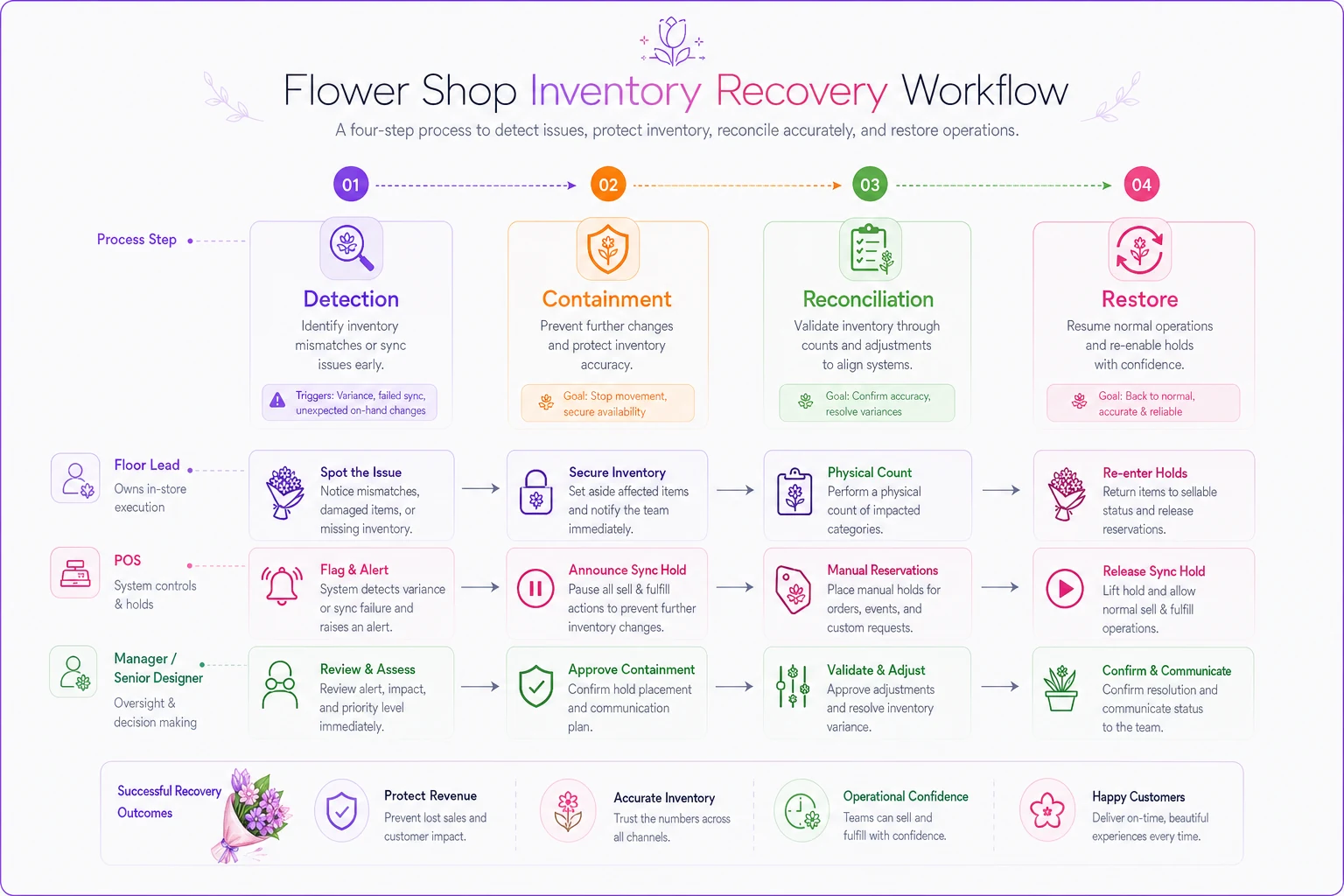
The whole loop should be run as written; skipping containment is the common failure mode.
Short engineering checklist (for whoever owns your tech)
If you've got a developer, an integration partner, or you're evaluating a platform, these are the non-negotiables. Hand this list to them directly.
-
Idempotency keys on every write. A retried "sell this unit" request must not sell it twice. Each sale carries a unique key; the system ignores duplicates. This single feature prevents the most common sync-retry double-sell.
-
Audit fields on every inventory change. Who, what, when, which channel, previous value, new value. Without this, reconciliation is guesswork.
-
Retry with backoff, not retry-hammer. When a channel fails to sync, it should retry on an increasing delay (e.g., 1s, 2s, 4s, 8s), not fire repeatedly and compound the mess.
-
Reservation holds are server-side, not browser-side. A hold that only lives in someone's browser tab vanishes when they close it — the item was never actually protected.
-
Hard fail closed, not open. If the system can't confirm availability, it should block the sale, not assume the item is there. Erring toward "unavailable" costs you one sale; erring toward "available" costs you a double-sell plus a disappointed customer.
A well-built operational platform handles most of this quietly in the background — idempotency and server-side holds especially — which is the difference between a system that reports inventory and one that actually enforces it. If you're assessing tools, ask vendors directly how they handle retries and holds. Vague answers are a red flag.
Monitoring & alert thresholds
You can't watch three dashboards all day. Set thresholds so the system — or your opening and closing routine — tells you when something's wrong.
-
Sync staleness alert any channel's last-sync timestamp older than 5 minutes during open hours → yellow. Older than 10 minutes → red, trigger the Quick Recovery SOP.
-
Scarce-SKU reservation collision two holds placed on the same ≤3-on-hand SKU within the hold window → immediate notify to Floor Lead.
-
Walk-in logging lag if the gap between physical sale and system entry regularly exceeds 2 minutes, that's a process problem, not a one-off.
-
Reject rate on wire orders a sudden spike in "cannot fulfill" rejections usually means your available counts are drifting from reality — reconcile before it becomes a double-sell.
The twice-daily visual check in step 6 exists precisely because small shops rarely have someone staring at alerts all day. Baking it into open and close means it actually happens.
Staff message templates
When a double-sell slips through, the recovery conversation matters more than the mistake. Keep these short, honest, and ready to send.
> "I'm so sorry — that one just went in the last few minutes and our systems crossed. I can do [similar SKU] at the same price, or put together something close with what's freshest right now. Which works better for you?" To a walk-in customer (item just sold out from under them):
> "Thanks for your order! One quick thing — the [item] sold out right as your order came through. I'd love to either upgrade you to [next-tier item] at no extra charge, or refund you today, no hassle. Just reply and let me know." To a web customer (order confirmed but can't be filled):
> "Unable to fulfill [order #] — requested item out of stock. Available to fill with equivalent substitution if approved." To a wire-service partner (rejecting an incoming order):
> "Sync hold — manual reservations only, freeze all scarce SKUs, no new wire orders until I call clear." Internal, Floor Lead to team (declaring sync hold):
The upgrade-at-no-charge offer costs a few dollars of margin but almost always keeps the customer and kills the bad review. Cheapest insurance in the shop.
Physical staging controls
Software holds mean nothing if the physical stem is sitting unguarded in the cooler where anyone can grab it for a different order. The digital and physical worlds have to agree.
-
Pulled = tagged. The moment a designer pulls stems for a committed order, they go in a tagged holding bucket with the order number. No tag, no pull.
-
Scarce SKUs get a physical "last few" marker in the cooler — a colored clip or tag — so staff see scarcity before the system has to tell them.
-
A pulled order has a staging zone, separate from general stock. Finished arrangements waiting for pickup or delivery never sit where a walk-in can be sold from them.
-
End-of-day, the staging zone gets reconciled against the order list. Anything unaccounted for is tomorrow's near-miss waiting to happen.
The recurring failure here is the "I'll grab it in a sec" pull — a designer mentally reserves stems, physically leaves them in general stock, and someone else sells them. Tag it or it isn't held.
A real scenario
A two-location florist running web, walk-in, and two wire services kept hitting the same wall around Valentine's and Mother's Day: roughly four to six double-sells per peak weekend, each one costing a scramble, a substitution, and occasionally a refund plus an apology bouquet. A few hundred dollars in direct cost per peak event, plus the stuff you can't easily price — staff stress and the odd one-star review.
The fix wasn't fancy. They declared a single inventory source, moved holds server-side, added the twice-daily sync check, and posted the tie-break matrix at both counters. The biggest single lever turned out to be step 4 — getting walk-in sales logged inside a minute instead of "whenever it's quiet." That one change closed most of the gap.
By the following peak weekend, double-sells dropped to one, caught early and resolved with a free upgrade before the customer even noticed. Not zero, but close — and the recovery was calm instead of chaotic.
Monthly test & drill plan
A recovery SOP nobody has practiced is just a document. Run a short drill once a month — 20 minutes is enough.
-
Pick a quiet weekday. Don't drill during peak; you're building muscle memory, not stress-testing live operations.
-
Simulate a sync failure. Have someone announce "sync hold" cold. Watch whether containment actually happens in order.
-
Run one full reconciliation on a single scarce SKU. Time it. If it takes more than 10 minutes on one SKU, your audit trail or physical staging needs work.
-
Test the tie-break matrix with a verbal scenario
"walk-in paying vs. incoming wire, last unit — go." The right answer should come instantly.
-
Review last month's near-miss log. Any pattern? Same SKU, same channel, same time of day? That's where your next fix lives.
-
Update defaults if needed. If holds kept getting extended or expiring too early, adjust the durations table and note the change.
Rotate who leads the drill so it's not always the same person who knows the moves. The whole point is that recovery works even when your most experienced hand is off that day.
Pulling it together
Double-sells aren't a discipline problem — they're a coordination problem between three channels that each think they're the only one shopping your cooler. The checklist gives you the enforcement layer, the reservation durations give you the timing, the tie-break matrix settles arguments before they start, and the Quick Recovery SOP keeps a bad minute from becoming a bad afternoon.
Start with the two steps that move the needle fastest: declare one inventory source, and get walk-in sales logged inside sixty seconds. Add the rest as you go. For the underlying policy and pricing logic that sits beneath all of this, the deeper rules in Prevent double-sells: wire-service reservation, pricing and fulfillment rules for small shops are worth keeping open in the next tab while you build your version of this runbook.
Start with the two steps that move the needle fastest: declare one inventory source, and get walk-in sales logged inside sixty seconds.
For the underlying policy and pricing logic that sits beneath all of this, the deeper rules in Prevent double-sells: wire-service reservation, pricing and fulfillment rules for small shops are worth keeping open in the next tab while you build your version of this runbook.
Ready to grow your flower shop business?
Join 500+ flower shops using Blomsly to save time, reduce errors, and delight customers with fresh blooms.