


You've been batching deliveries by zip code or neighborhood for a while now. Maybe you print the day's orders, spread them on the design table, and sort them into "north side," "east side," and "everything near the hospital." It works. It's cheap. And for a long time it's the right call.
The question that actually matters isn't "is routing software good?" It's "has my shop crossed the line where manual batching is now quietly costing me more than software would?" Most florists ask this too late — usually after a Mother's Day where the driver came back at 7pm and three arrangements wilted in a hot van.
So this guide gets specific about where that line is, which features actually matter for flower delivery (most routing software is built for pizza and parcels, not perishables), and how to test it in six weeks without blowing up your operation during a busy stretch.
If you haven't locked down your manual process yet, start there — the neighborhood batching heuristics guide covers the fundamentals. This article assumes batching is already working and you're deciding whether to graduate from it.
The honest triggers: when manual batching stops paying off
Software salespeople will tell you to buy at 10 orders a day. That's nonsense for most shops. Plenty of florists run clean manual routes at 25–30 deliveries a day because their delivery zone is tight and predictable.
Trigger 1 — Batching time is eating a real chunk of someone's morning. If whoever builds the route is spending more than 30–40 minutes a day sequencing stops, and that person is also your lead designer or you, that's expensive time disguised as a free task. At roughly $18–$22/hour of loaded labor, 40 minutes a day is close to $3,000–$3,500 a year — and it's happening during your highest-value morning hours.
Trigger 2 — Order volume has become variable, not just high. Steady 20-a-day is manageable by hand. The problem is the swing: a normal Tuesday at 12 deliveries, then a Friday at 34, then a holiday week at 90+. Manual batching breaks down under variance, not average load. If your busy days feel chaotic and your slow days feel fine, you're at the edge.
Trigger 3 — You're running two or more vehicles. One driver, one van — you can sequence that in your head. The moment you're splitting work across two drivers (or a driver plus a part-timer plus the occasional courier), the balancing problem gets genuinely hard. Deciding who takes which half of the city, and keeping the loads even, is where people lose 45 minutes and still get it wrong.
Trigger 4 — Time-window orders are creeping up. Funeral deliveries that must land before a service. Corporate accounts with a "before 10am" SLA. Hospital deliveries before visiting hours end. When more than 15–20% of your daily orders carry a hard time window, manual sequencing starts failing — a human can't juggle geography and time constraints at once without a spreadsheet.
If you're nodding at two or more of these, keep reading. If only one applies, you can probably squeeze another season out of manual batching.
Why florist routing is different (and why generic software disappoints)
A common mistake: shops download a popular delivery-routing app, try it for a week, and give up because it "doesn't get flowers." They're not wrong.
Never miss a bloom or a delivery.
Blomsly helps you manage orders, track stock, and schedule deliveries effortlessly.
- Unified order management
- Real-time inventory tracking
- Delivery scheduling & notifications
No credit card required
-
Arrangements have different fragility and heat tolerance. A dozen roses in foam survives a bumpy afternoon. A tall gladiolus arrangement riding loose does not.
-
Time windows are non-negotiable for funerals and events, but totally flexible for a "surprise bouquet for mom whenever."
-
Vehicle capacity is about volume and stability, not just weight. You can't stack vase arrangements.
-
Loading order matters. Last-in-first-out means the route sequence has to match how the van gets packed, or your driver is climbing over a wedding centerpiece to reach a get-well bouquet.
So "florist routing software" that actually helps isn't the one with the slickest map. It's the one that lets you encode these constraints — which brings us to the checklist.
The feature checklist, prioritized for florists
Not every feature is worth paying for. These are split into must-haves, strong-value, and nice-to-haves so you don't overbuy.
Must-have (don't adopt without these):
-
Hard time-window support per stop (not just "optimize for speed")
-
Multi-vehicle route balancing
-
Manual override — you can drag a stop to a different driver or resequence without the software fighting you
-
Driver mobile app with turn-by-turn and proof-of-delivery (photo + timestamp)
-
Ability to lock a stop's position in the sequence (for fragile or must-be-last items)
Strong value (worth paying a bit more):
-
Delivery notifications to recipients/senders ("your flowers are on the way")
-
Live driver tracking so the front desk can answer "where's my order" without calling the driver
-
Integration with your POS or order system (more on this below)
-
Historical route data so you can see actual vs. estimated times
Nice-to-have (don't pay a premium for these):
-
Customer-facing live map link
-
Route "cost" analytics and fuel reporting
-
Automatic re-optimization mid-route if a stop is added
Most shops get this backwards: they obsess over the optimization algorithm and ignore the manual override and proof-of-delivery features. In day-to-day reality, a driver who can snap a photo at the door and a manager who can drag one urgent stop to the front of the line save you more grief than a 4% shorter route ever will.
Scoring matrix: how to compare your options
Don't evaluate on gut feel or the demo's polish. Score each tool you're seriously considering against weighted criteria. Here's a matrix you can copy:
| Criterion | Weight | Tool A | Tool B | Tool C |
|---|---|---|---|---|
| Time-window handling | 20% | |||
| Multi-vehicle balancing | 15% | |||
| Manual override ease | 15% | |||
| Driver app + proof of delivery | 15% | |||
| POS / order integration | 10% | |||
| Recipient notifications | 10% | |||
| Monthly cost vs. budget | 10% | |||
| Support quality / onboarding | 5% |
Score each cell 1–5, multiply by the weight, sum the columns. The highest total wins — not the one with the prettiest interface. Run the demo with your own worst day's orders, not the sample data. Ask the salesperson to load 35 real stops including three funeral windows and watch what happens.
Worth noting: the tools that score highest on "manual override ease" tend to score lowest on flashy marketing. The genuinely useful ones assume you know your city better than the algorithm does.
Integration and data migration: the unglamorous part that trips everyone up
This is where adoptions stall. The software works fine; the data flow doesn't.
A realistic migration sequence:
-
Export a clean address list. Pull your last 60–90 days of delivery orders. You're checking for how messy your address data actually is — missing apartment numbers, "the blue house," business names without street numbers.
-
Clean the obvious garbage. Standardize your worst repeat offenders (hospitals, funeral homes, big office buildings). Save these as "favorite locations" in the new tool so they never need re-entry.
-
Connect your order source. If your POS or e-commerce platform has an integration or export, map the fields: recipient name, address, phone, delivery window, special instructions. Test with five orders before trusting it with fifty.
-
Keep a manual fallback for week one. Do not delete your paper process yet. Run both in parallel until the data flow proves reliable.
Keep a manual fallback for week one.
The address-quality issue is the sleeper problem. Routing software is only as good as your addresses, and most shops discover their order intake has been quietly tolerating vague addresses that a human driver "just knew." The software doesn't know. Fix intake before you blame the tool.
Expected costs and the ROI signals that actually matter
Pricing for florist-appropriate routing tools generally lands somewhere in the $40–$150/month range for a small single-location shop, depending on vehicle count and features. Per-driver pricing is common. Some charge per stop at high volume, which can bite you at holidays — read that fine print carefully.
The ROI case isn't dramatic. Don't expect the savings to show up as a big fuel reduction. For a tight urban delivery zone, optimized routes might trim 5–10% off mileage. That's real but not the story.
The bigger returns, in order of impact:
-
Recovered labor time. The 30–45 daily minutes someone spent batching, handed back to design or sales work.
-
Fewer late deliveries on time-window orders. One blown funeral delivery can cost you a standing account worth thousands a year. Preventing even two or three of those annually pays for the software several times over.
-
Fewer "where's my order" phone calls. Live tracking and auto-notifications quietly remove a chunk of front-desk interruptions, especially on busy days.
-
Better load balancing across drivers, which on heavy days can mean finishing the route an hour earlier and getting the van back before the afternoon rush.
If you want a clean ROI signal to track, watch on-time rate for time-window deliveries and daily batching minutes. Those two numbers moving in the right direction tell you more than any fuel report.
A 6-week pilot plan that won't wreck your operation
The worst time to learn new software is mid-holiday. Run your pilot during a normal, non-peak stretch, and build it to prove or kill the decision without betting the shop on it.
[Week 1: Setup & Shadow] → [Week 2: One Driver, Real Routes] → [Week 3: Time Windows & POD] → [Week 4: Multi-Vehicle Load Test] → [Week 5: Notifications & Tracking] → [Week 6: Data Review & Decision]
Week 1 — Setup and shadow. Load your favorite locations, connect the order feed, and run the software alongside your normal paper process. Don't follow its routes yet. Just compare what it suggests to what you'd have done by hand. You're building trust and spotting weirdness.
Week 2 — One driver, real routes. Pick your most reliable driver and let them run the software's route for real on normal-volume days. Keep the paper route in the glovebox as backup. Collect feedback daily: Did the sequence make sense? Did the app work at the door?
Week 3 — Add time windows and proof of delivery. Now stress-test the hard part. Push your funeral and corporate orders through with their real windows. Turn on photo proof-of-delivery. See if on-time performance holds.
Week 4 — Second vehicle / load balancing. If you run multiple drivers, bring the second one in now and test how the tool splits and balances the work. This is the feature that's hardest to evaluate from a demo, so give it real volume.
Week 5 — Turn on notifications and tracking. Enable recipient/sender notifications and live tracking for the front desk. Track how many "where is it" calls drop. Ask your counter staff if it's helping or just creating more noise.
Week 6 — Decide with your numbers. Pull the data. Compare these before/after metrics:
Pilot workflow visual:
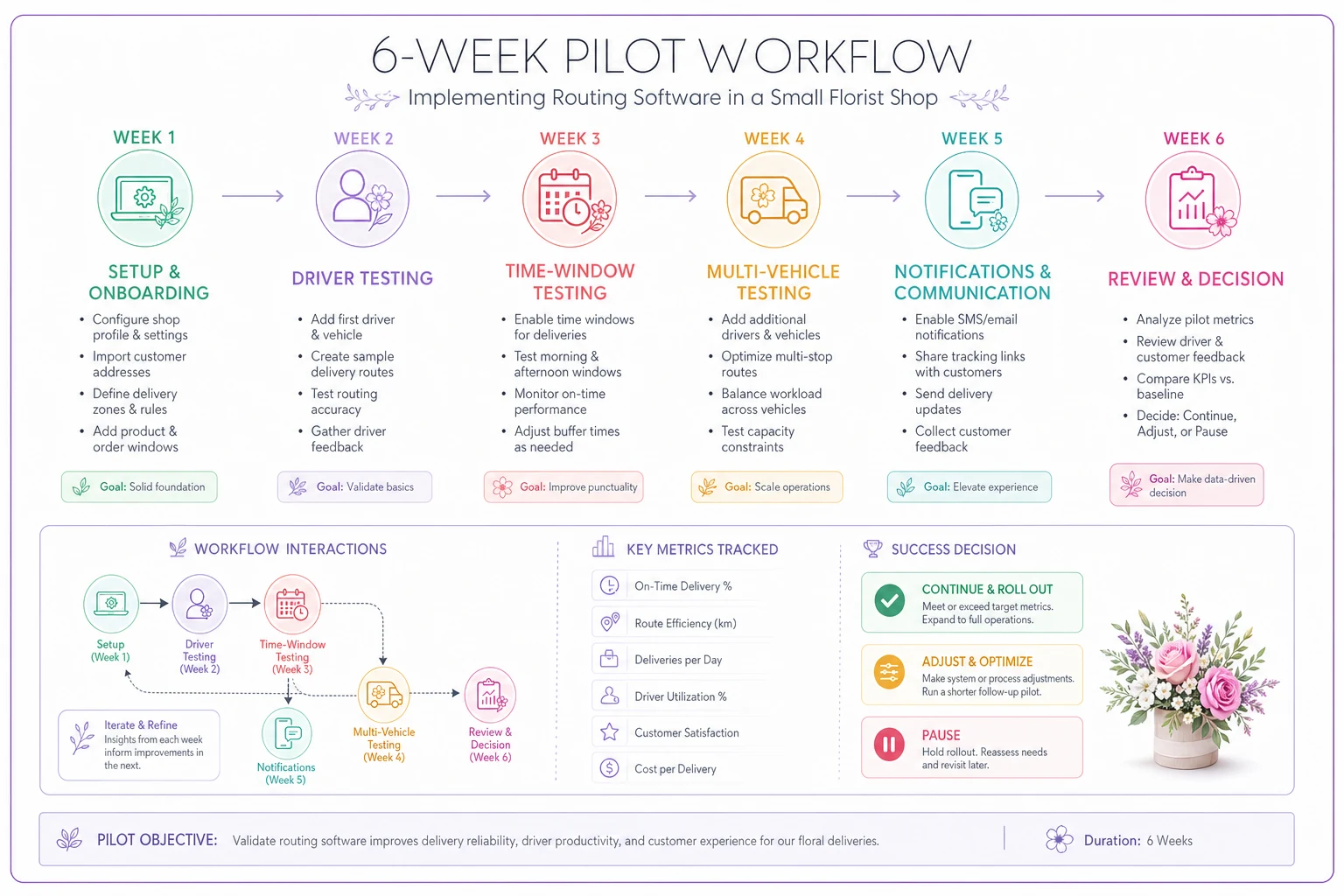
Use this to walk staff through the plan.
-
Daily minutes spent building routes
-
On-time rate for time-window deliveries
-
Number of order-status calls to the front desk
-
Driver finish times on busy days
-
Any delivery failures or damaged-arrival complaints
If batching time dropped meaningfully and on-time rates held or improved, keep it. If the data flow stayed clunky and you were still retyping addresses, walk away — the tool isn't right for your intake setup, and that's a legitimate outcome.
A real scenario
A two-van shop doing roughly 18 deliveries on a normal day, spiking to 40+ on Fridays and funeral-heavy weeks. The owner's daughter was spending about 45 minutes every morning sorting orders into two routes, and even then the loads came out lopsided — one driver back by 1pm, the other still out at 4.
During a six-week pilot on a routing tool with proper time-window and multi-vehicle support, morning sequencing dropped to about 10 minutes (review and tweak, not build from scratch). The real win wasn't fuel — mileage barely moved. It was that funeral deliveries stopped slipping past their service times, because the software refused to sequence a 10am-window stop into the afternoon. Over the pilot, zero missed funeral windows versus the two or three near-misses a busy month usually brought. The daughter got her mornings back for actual design work. They kept the software.
No dramatic revenue jump, no magic. Just a few quiet, compounding wins that added up to an obvious yes.
When this is actually a bad idea
Software isn't always the answer, and anyone telling you otherwise is selling something.
-
You deliver fewer than 10–12 orders a day in a tight zone and your current process never fails.
-
Your order intake is a mess and you're not willing to fix address quality first — the tool will amplify the chaos, not fix it.
-
You're heading into peak season. Adopt in the quiet months. Never pilot software three weeks before Valentine's Day.
-
You only run one van and one driver who knows the city cold. The balancing and sequencing math that justifies these tools mostly kicks in with volume or multiple vehicles.
If manual batching genuinely isn't costing you time, errors, or late time-window deliveries, you don't have a problem to solve yet. Routing software earns its keep when variance, time windows, and multiple vehicles collide — and not much before that.
Adopting routing software is a timing decision more than a technology decision. Run the triggers against your own shop: batching time, order variance, vehicle count, and the share of hard-window deliveries. If two or more are pinching, build the six-week pilot into a quiet stretch, measure the two numbers that matter (batching minutes and time-window on-time rate), and let the data make the call.
Whatever you decide, keep your neighborhood batching logic sharp either way — the software should encode the geography sense you already have, not replace your judgment about your own city.
Ready to grow your flower shop business?
Join 500+ flower shops using Blomsly to save time, reduce errors, and delight customers with fresh blooms.